

In the relentless pursuit of productivity, many organizations have overlooked a silent but pervasive threat lurking in the very tools we use every day: the traditional, poorly configured workstation. Far from being a mere comfort preference, the adoption of an ergonomic setup is a profound investment in human capital and a powerful, measurable strategy to curb the crippling costs and human suffering associated with workplace injuries.
Let’s dive deep into the different ways ergonomic workstations actively diminish the risk of these debilitating injuries, thereby securing a safer and more productive professional environment.
Minimizing Repetitive Strain and Cumulative Trauma
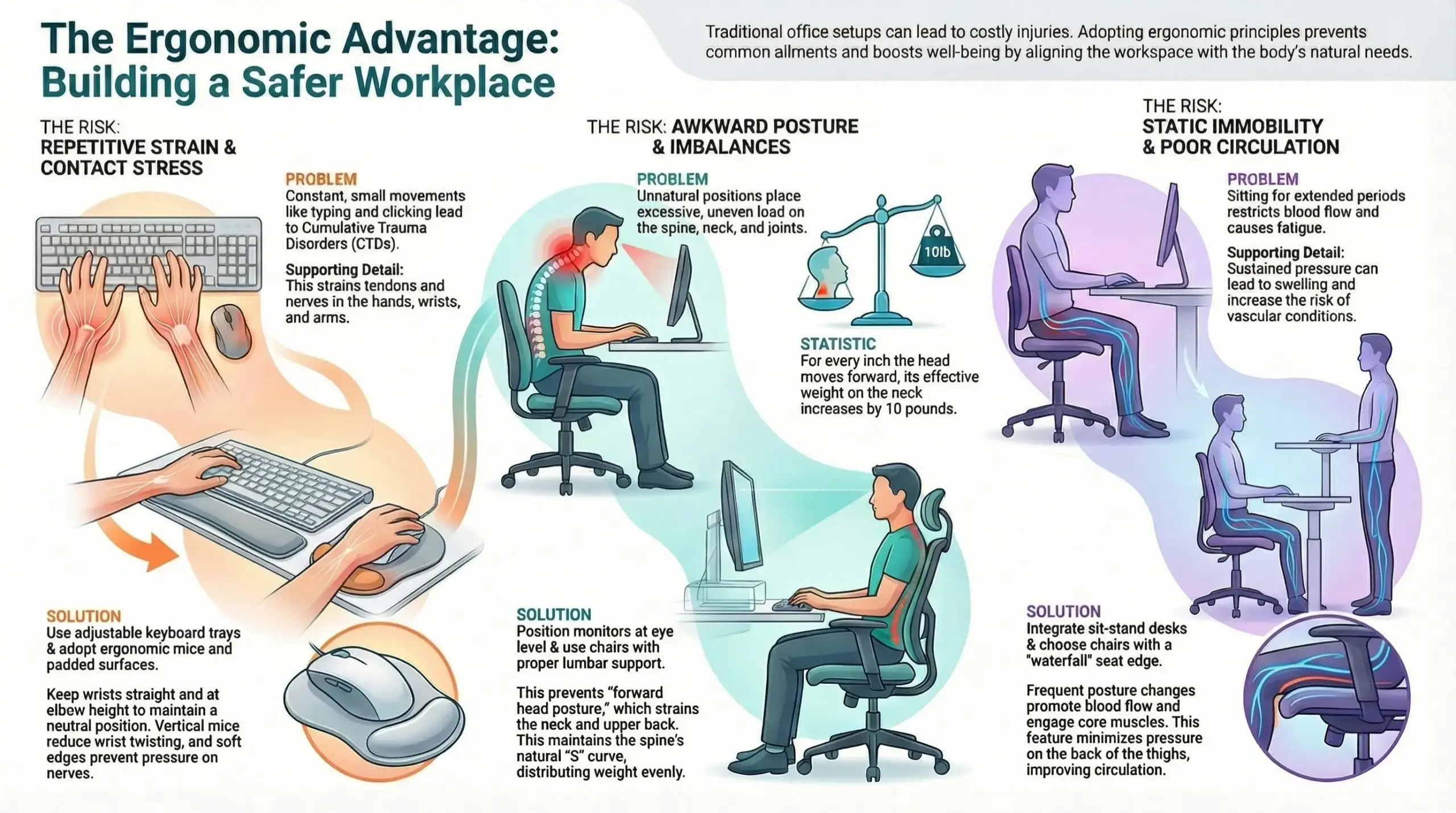
The nature of modern office work demands countless repetitions: typing, clicking, and constant mouse manipulation. Performing these small, highly localized movements over hundreds of hours without adequate support or proper positioning is the classic recipe for cumulative trauma disorders (CTDs). An ergonomic workstation directly addresses this by introducing components that minimize the actual physical work required and ensure movements occur within the body’s natural range.
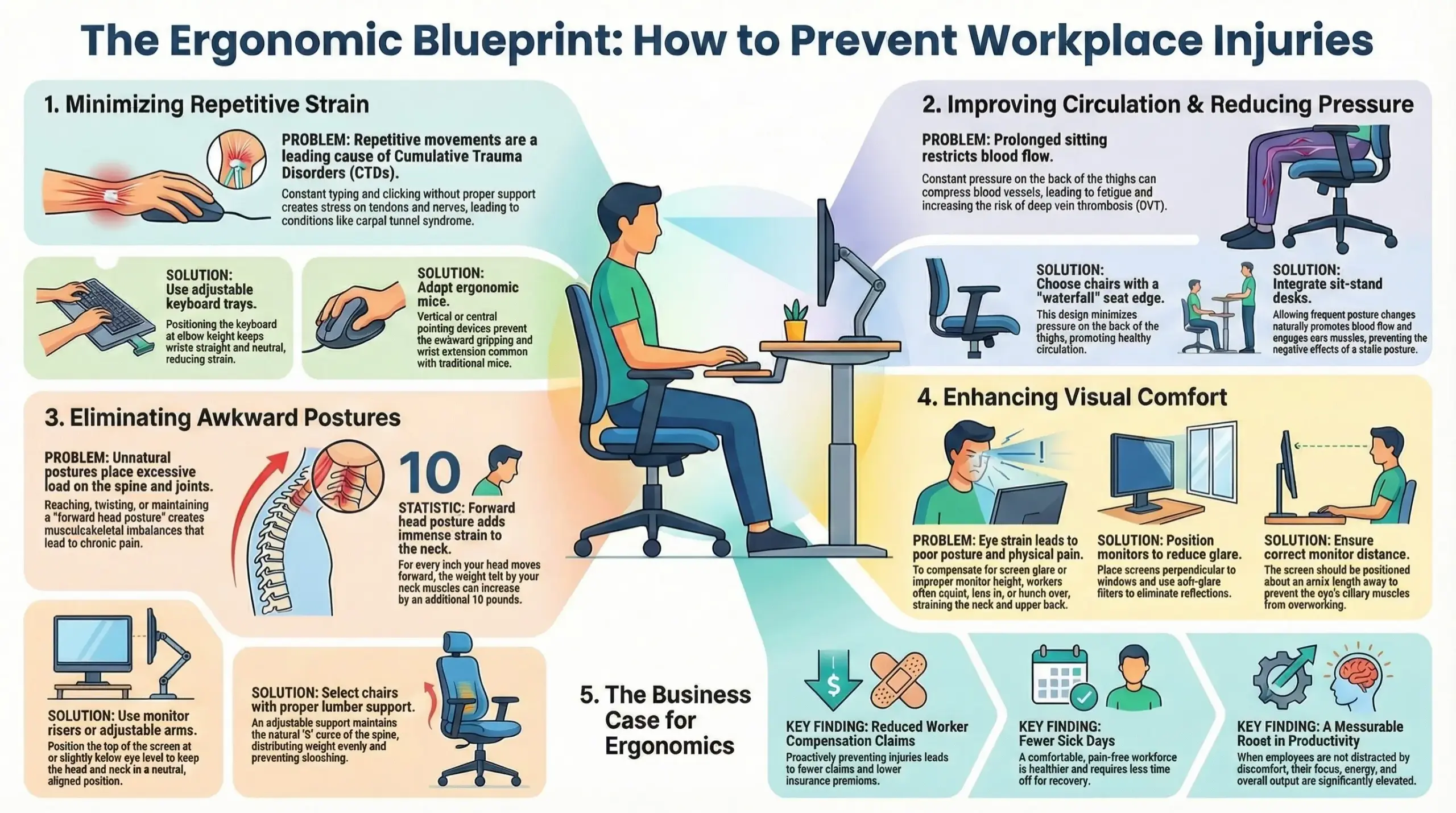
For instance, an adjustable keyboard tray allows the user to position the keyboard at elbow height, keeping the wrists straight and neutral, which is key. Furthermore, the selection of an appropriately sized, vertically oriented mouse or a central pointing device reduces the awkward and repetitive gripping and wrist extension that characterize traditional mouse use.
These seemingly minor adjustments drastically reduce the internal friction and stress on tendons and nerves, slowing or entirely preventing the onset of chronic inflammation like tenosynovitis or the pressure build-up typical of carpal tunnel syndrome. The goal is to distribute the work across larger muscle groups and minimize sustained pressure on vulnerable structures.
Improving Circulation and Reducing Sustained Pressure

A static, sedentary work environment poses a significant threat to systemic health, primarily through restricting blood flow. Sitting for extended periods in a chair that puts pressure on the backs of the knees or thighs can compress major blood vessels, hindering circulation and leading to localized swelling, discomfort, and fatigue. The lack of movement can also lead to pooling of blood in the lower extremities, contributing to conditions like deep vein thrombosis (DVT) over time.
Ergonomic design champions components that facilitate and encourage movement while ensuring contact points are supportive rather than compressive. An ergonomically designed chair features a waterfall edge on the seat pan to minimize pressure on the backs of the thighs. A footrest is also a critical tool for shorter workers, ensuring the feet are fully supported and pressure is taken off the lower limbs.
The integration of sit-stand desks actively combats the static nature of work by allowing frequent changes in posture, which naturally promotes blood flow and engages stabilizing core muscles. This constant, subtle shift prevents the sustained, harmful pressure that otherwise compromises vascular health and causes muscle ischemia (lack of blood flow to muscle tissue).
The shift to dynamic, circulation-promoting office furniture is a direct investment in the long-term well-being of staff. Thus, it’s worth partnering with a supplier of commercial office furniture Melbourne organizations trust. This ensures that the pieces you’ll get aren’t only ergonomically sound but also built to last.
Eliminating Awkward Postures and Musculoskeletal Imbalances
One of the most significant injury risks in any office setting stems from the prolonged maintenance of awkward postures, where body parts are held outside of their natural, neutral alignment. This includes reaching overhead, twisting the trunk, or holding the head bent forward.
These unnatural positions place uneven, excessive load on joints, ligaments, and spinal discs. An ergonomic workstation systematically removes these physical stressors. A properly adjusted ergonomic chair, which supports the natural ‘S’ curve of the spine with a lumbar support, ensures that the pelvis is slightly tilted forward, maintaining optimal spinal alignment and distributing weight evenly across the sitting bones.
Also, the use of monitor risers or adjustable arms ensures the top of the screen is at or slightly below eye level, preventing the common “forward head posture.” This posture, where the head juts forward, places massive strain on the cervical spine and neck muscles, for every inch the head moves forward, the weight felt by the neck muscles can increase by an additional ten pounds, quickly leading to debilitating chronic pain and tension headaches.
Correct positioning through ergonomics ensures the worker remains centered, balanced, and free from injurious twisting or prolonged flexion.
Enhancing Visual Comfort and Reducing Eye Strain
Though often overlooked in the context of physical injuries, chronic visual discomfort and eye strain are precursors to posture problems and can lead to significant physical pain.
A monitor that’s too bright, too dim, positioned incorrectly, or displaying glare forces the worker into compensatory postures. Squinting, leaning in toward the screen, or adopting a hunched position to mitigate reflections are common reactions that directly violate neutral posture and induce strain in the neck and upper back.
An ergonomic workstation addresses this by tackling environmental and equipment factors. This includes employing anti-glare screens, positioning the monitor perpendicular to windows to avoid reflections, and carefully managing lighting. Moreover, setting the correct monitor height and distance (typically arm’s length) ensures the ciliary muscles of the eyes are not constantly struggling to focus, reducing fatigue and the subconscious need to lean forward.
By optimizing the visual field, ergonomics eliminates the need for the user to make physical adaptations to see clearly, keeping the head and neck aligned and reducing the resulting tension in the upper quarter of the body.
Managing Force and Contact Stress Effectively
Ergonomics fundamentally aims to reduce the magnitude of force required to complete a task and eliminate sources of contact stress. This type of stress occurs when a hard or sharp object repeatedly or continuously presses against a part of the body, creating localized pressure that can damage underlying nerves and tendons. A classic example is the sharp edge of a desk cutting into the underside of the wrists while typing, a direct route to nerve irritation.
An ergonomic setup mitigates this by using rounded, padded edges where the body interacts with the furniture. Additionally, the use of light-touch keyboards, high-quality precision mice, and well-designed peripheral tools minimizes the muscular effort needed for repetitive input tasks. For tasks requiring higher force, such as using certain manufacturing tools, ergonomic interventions involve counterbalancing the weight of the tool or redesigning the grip to utilize the whole hand (power grip) rather than just the fingers (pinch grip).
Conclusion
The shift to ergonomic workstations fosters an environment where focus is maintained, energy is preserved, and overall well-being is elevated. The investment yields tangible returns through reduced worker compensation claims, fewer sick days, and a noticeable boost in productivity due to a comfortable, pain-free workforce. Ultimately, the ergonomic workstation is the bedrock of a sustainable, healthy, and highly functional professional life, proving that caring for the body is the most intelligent form of business optimization.