A DSE assessment is a structured evaluation of how an employee interacts with their entire workstation — display screen, keyboard, mouse, chair, desk, lighting, and working patterns — carried out to identify health risks from prolonged screen use and determine the controls needed to reduce them. Under the UK's Health and Safety (Display Screen Equipment) Regulations 1992, employers must conduct DSE assessments for all workers who use display screen equipment daily for continuous periods of an hour or more. The assessment is not a one-off equipment check; it is an ongoing obligation tied to the person, the workstation, and any change that affects either.
What Is a DSE Assessment?
A DSE assessment is a workstation-level risk assessment focused on display screen equipment and the surrounding work environment. The term "DSE" — Display Screen Equipment — covers any alphanumeric or graphic display used as part of normal work, but the assessment itself extends well beyond the screen. It evaluates the monitor, keyboard, mouse, chair, desk, lighting, software interface, and the individual's working patterns as an integrated system.
The purpose is specific: identify risks to health and comfort before they cause harm, then determine control measures that reduce those risks to the lowest reasonably practicable level. In regulatory terms, it sits within the broader duty of care framework employers already operate under — the Health and Safety at Work etc. Act 1974 (UK) — but is given its own detailed requirements by the Health and Safety (Display Screen Equipment) Regulations 1992.
You may hear it called a workstation assessment, VDU assessment, or ergonomic assessment. These terms overlap but are not identical — a point addressed later in the FAQ. What matters operationally is that a DSE assessment evaluates the interaction between a specific person and their specific workstation. Two employees sitting at identical desks with identical equipment can produce entirely different risk profiles based on their posture habits, physical dimensions, visual requirements, and working patterns.
A persistent misunderstanding treats DSE assessment as a one-time equipment check — verify the chair adjusts, confirm the monitor is present, tick the box. That misses the point entirely. The assessment is about how the individual works, not just what equipment they have. A fully adjustable ergonomic chair that the user has never been shown how to operate is functionally identical to a wooden stool.
What Counts as Display Screen Equipment?
The regulations do not list specific device brands or models. They cover any alphanumeric or graphic display screen used as a significant part of normal work. In practice, this includes desktop computers, laptops, tablets, and smartphones — provided the device is used regularly and for sustained periods.
Equipment that falls clearly within scope includes desktop monitors, laptop screens, touchscreen terminals, CCTV monitoring displays, and process control screens. Trading terminals, CAD workstations, and call centre systems all qualify. The test is functional, not technological: if a worker uses the screen continuously for an hour or more daily as part of their normal duties, the equipment is DSE.
Exclusions under the regulations are narrow. Cash registers with small displays, portable devices not in prolonged use, calculator screens, traditional typewriters, and equipment with only small data readouts fall outside scope. These exclusions matter less than employers typically assume — the grey areas cause more problems than the clear exclusions.
The most frequent grey area involves hybrid device use. A worker who uses a laptop for forty minutes, switches to a tablet for another thirty, then returns to the laptop has accumulated well over an hour of screen time — but neither device was used for a continuous hour. The regulations focus on daily patterns of use, not individual device sessions. Employers who classify based on single-device duration rather than cumulative screen exposure undercount their DSE user population.
Who Is Classified as a DSE User?
The classification of who qualifies as a DSE user drives the employer's legal duties. Under the Health and Safety (Display Screen Equipment) Regulations 1992 (UK), a DSE user is anyone who uses display screen equipment daily for continuous periods of an hour or more as a significant part of their normal work.
This captures most office-based roles: administrative staff, designers, data entry operators, call centre workers, financial traders, software developers, and the broad category of knowledge workers whose output is screen-mediated. It also covers roles less obviously associated with desk work — CCTV operators monitoring screens for full shifts, warehouse supervisors using handheld devices for extended inventory work, and engineers running CAD software at portable workstations.
Occasional or infrequent users — those who use DSE for less than an hour daily or not on most working days — fall outside the formal classification. However, the employer's general duty of care under Section 2 of the Health and Safety at Work etc. Act 1974 still applies to all workers, regardless of DSE classification.
The classification applies irrespective of work location. An employee working from home, from a co-working space, or on a hybrid schedule is classified by the same criteria. The location changes the practical challenge of conducting the assessment, but it does not change the legal obligation.
A practical test employers can apply: Does this employee use a screen for an hour or more on most working days? Is that screen use a normal, expected part of their role rather than an occasional activity? If both answers are yes, they are a DSE user.
Why Are DSE Assessments a Legal Requirement?
The legal framework anchoring DSE assessments in the UK is the Health and Safety (Display Screen Equipment) Regulations 1992, as amended in 2002. These regulations were made under the Health and Safety at Work etc. Act 1974 — the parent statute that imposes the general duty on employers to ensure the health, safety, and welfare of employees so far as reasonably practicable.
The DSE Regulations originally transposed EU Council Directive 90/270/EEC (1990), which established minimum safety and health requirements for work with display screen equipment across EU member states. Post-Brexit, the UK regulations continue to operate independently. The Directive remains in force for EU member states, and — critically for multinational employers — the EU's Strategic Framework on Health and Safety at Work 2021–2027 has flagged Directive 90/270/EEC for review in light of digitalisation and the growth in teleworking (European Commission, 2021). The assessment process was initiated from 2023 and remains ongoing. If the EU updates the Directive, UK and EU frameworks may diverge for the first time, creating compliance complexity for employers operating across both jurisdictions.
A common employer misconception treats these regulations as outdated because they date from 1992. In practice, the DSE Regulations remain the primary UK compliance framework for screen-based work and are actively enforced. HSE issued improvement and prohibition notices under these regulations in recent years, and non-compliance exposes employers to both enforcement action and personal injury claims from employees who develop work-related conditions.
Regulatory content here reflects general HSE professional understanding of UK requirements as of 2025. It is not legal advice. Specific compliance questions, enforcement situations, or prosecution risk should be directed to qualified legal counsel in the applicable jurisdiction.
For employers with five or more employees, the Management of Health and Safety at Work Regulations 1999 require written records of risk assessments — including DSE assessments.
Employer Obligations Under the DSE Regulations
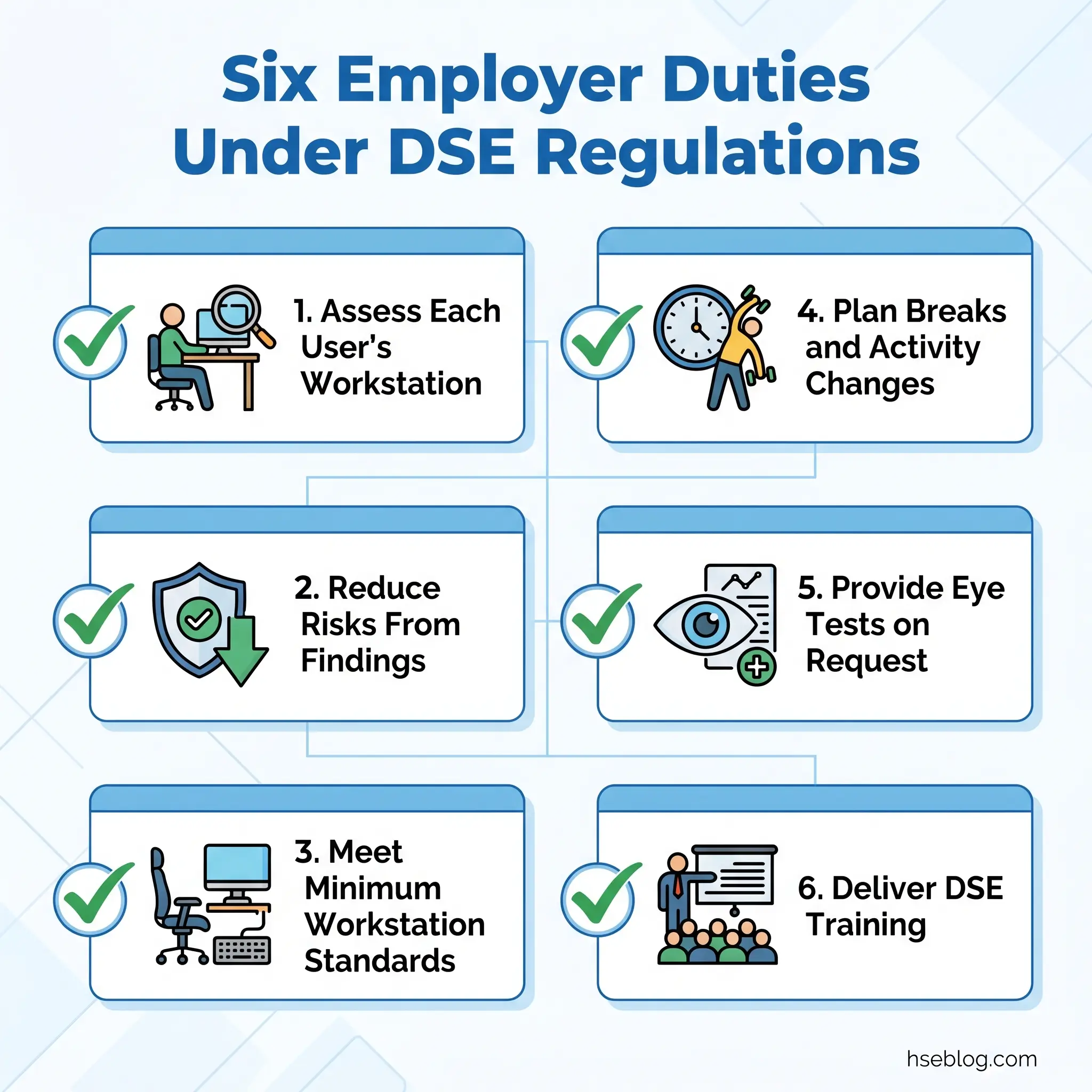
The DSE Regulations impose six core duties on employers. Each is straightforward in regulatory language but frequently misapplied in practice.
- Conduct a suitable and sufficient risk assessment of each DSE user's workstation. In practice, this means assessing the person-workstation interaction — not simply confirming equipment is present. The assessment must be specific to the individual user.
- Reduce identified risks to the lowest reasonably practicable level. This is where most failures occur. The obligation is not to assess but to act on findings. A completed checklist with identified risks and no corrective action is evidence of non-compliance, not compliance.
- Ensure workstations meet the minimum requirements set out in the Schedule to the Regulations. The Schedule specifies minimum standards for screens, keyboards, desks, chairs, environment, and software interface — detailed in HSE's L26 guidance.
- Plan work so DSE users have regular breaks or changes of activity. The regulations do not specify break duration or frequency. HSE guidance recommends short, frequent breaks rather than longer, infrequent ones. The break should involve a change of activity — standing, moving, or performing non-screen tasks — not simply switching to a different screen.
- Provide eye tests on request and fund corrective spectacles if required specifically for DSE work. This obligation is triggered by the employee's request. The employer cannot refuse and must cover the cost. If the eye test identifies a need for spectacles specifically for the DSE working distance (not general use), the employer funds a basic pair.
- Provide information and training to DSE users. Users must understand the risks, the purpose of the assessment, how to adjust their workstation, and their entitlement to eye tests and breaks.
Audit Point: The obligation most frequently neglected across organisations is duty number two — acting on findings. Many employers assess diligently, document thoroughly, and then fail to fund or implement the recommended adjustments. The assessment document exists; the risk reduction it was designed to trigger does not. An auditor tests this by comparing assessment findings against procurement records and workstation spot-checks.
What Does a DSE Assessment Cover?
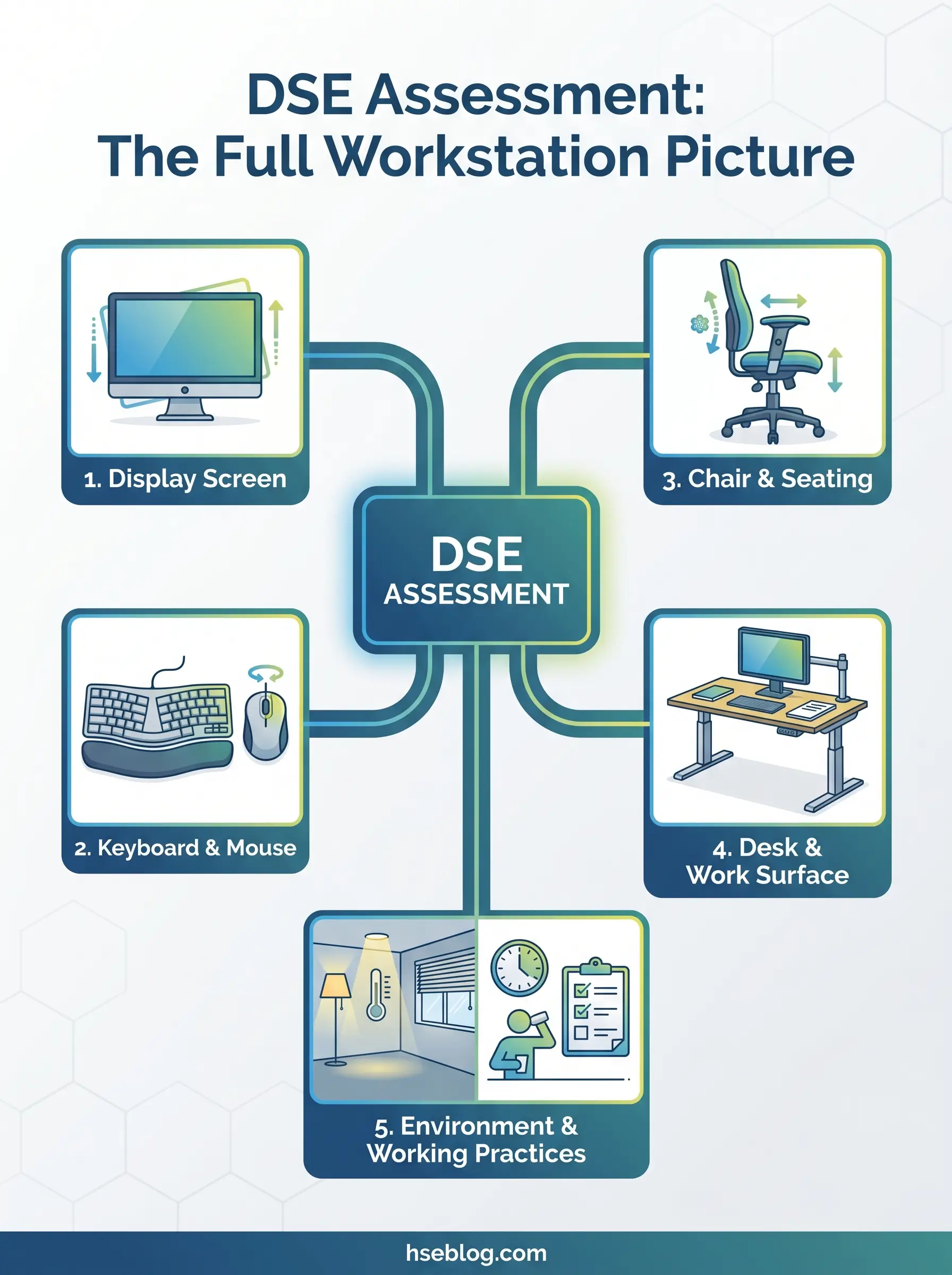
A DSE assessment evaluates six interconnected areas. Competitors in this space typically list these categories; the value for employers lies in understanding what the assessor — or the self-assessing employee — should actually be looking for in each, and what "good" looks like versus what gets flagged.
Display screen. Position, height, angle, viewing distance, brightness, contrast, and whether glare or reflections from windows or overhead lighting interfere with the image. The top of the screen should sit at or slightly below eye level. The viewing distance — roughly an arm's length — should allow the user to read without leaning forward. Stability matters: a screen that wobbles or drifts on its mount creates constant micro-adjustments in posture.
Keyboard and mouse. Placement relative to the user's seated position, wrist alignment, and whether the user is reaching or hunching to operate input devices. The keyboard should sit flat or at a slight negative tilt, with enough desk space in front for the user to rest their wrists. Mouse placement should allow the upper arm to remain relaxed and close to the body. Repetitive strain indicators — tingling, numbness, or aching in the wrist, forearm, or fingers — point directly to input device positioning or technique.
Chair. Adjustability is the minimum; whether the user knows how to adjust it is the real test. Assessment checks seat height, seat depth, backrest angle, lumbar support, and armrest position. The user's feet should rest flat on the floor (or on a footrest), thighs roughly horizontal, and the backrest supporting the natural curve of the lower spine. A fully adjustable chair that the user has never been shown how to operate is functionally the same as a non-adjustable one — and this is among the most frequently overlooked assessment findings.
Desk and work surface. Adequate surface area, sufficient leg room underneath, clear space for documents and peripherals, and appropriate height relative to the chair and user. Height-adjustable desks are increasingly common but not mandatory under the regulations. If the desk height is fixed, the chair height and monitor position must compensate.
Working environment. Lighting — both natural and artificial — must be appropriate for screen work, with glare controlled through blinds, screen positioning, or anti-glare filters. Temperature, noise, and ventilation are assessed for comfort. Environmental factors are frequently treated as outside the DSE assessment scope, but the Schedule to the Regulations explicitly includes them.
Working practices. Posture habits, break patterns, task variety, and any existing discomfort the user reports. This is the human-behaviour layer that separates a genuine DSE assessment from an equipment inventory. The assessor should observe or ask how the user actually works — not just what equipment they have.
Additional equipment needs identified during the assessment may include footrests, document holders, monitor arms, laptop stands, or wrist rests. These are control measures, not optional extras — if the assessment identifies them as necessary, the employer's duty is to provide them.
How to Conduct a DSE Assessment: Step-by-Step Process
The HSE's DSE workstation checklist (CK1) provides a practical, free-to-use framework for conducting assessments. However, simply distributing the checklist is not a process. A systematic approach ensures every DSE user is assessed, findings are recorded, and — critically — risks are actually reduced.
- Identify all DSE users. Apply the classification criteria from the regulations: anyone using DSE daily for continuous periods of an hour or more as a significant part of normal work. Do not limit identification to "desk-based" roles. Review job descriptions, but also observe actual work patterns — some roles involve more screen time than their formal description suggests.
- Select the assessment method. Three options are available, and the right choice depends on organisational scale and risk complexity:
- Trained assessor-led assessment — an in-house or external assessor evaluates the workstation with the user present. Most thorough; essential for complex cases.
- Self-assessment with review — the user completes a structured checklist, and a trained person reviews the responses and follows up on flagged issues. Efficient at scale.
- Digital or software-based assessment — online tools guide the user through the assessment and generate action reports. Useful for large or dispersed workforces, but only as effective as the review and follow-up process behind them.
- Assess each workstation. Whether assessor-led or self-assessed, the evaluation covers the six areas detailed above: screen, keyboard/mouse, chair, desk, environment, and working practices. The assessment is of the person-workstation interaction, not the equipment in isolation.
- Record findings and identify risks. Document what was observed, what meets the standard, and what requires action. For employers with five or more employees, written records are a legal requirement.
- Implement control measures. Provide equipment, adjust the setup, or modify working practices to address identified risks. This is the step that converts an assessment into risk reduction. Procurement delays, budget gatekeeping, or simply filing the assessment without follow-up all undermine compliance.
- Communicate results to the employee. Explain what was found, what action is being taken, and what the employee should do (e.g., adjust chair height, take regular breaks, request an eye test). The employee's understanding is part of the regulatory duty.
- Schedule review. Set trigger-based and time-based reassessment points. Specific triggers are covered in the next section.
Watch For: Self-assessment questionnaires are efficient at scale but introduce a known bias. Employees tend to report their workstation as satisfactory because they have adapted to it — even when an independent assessor would flag multiple issues. Organisations should validate self-assessment results with periodic spot-checks, particularly for employees who report zero issues across every category.
Who Can Conduct a DSE Assessment?
No formal legal qualification is mandated for DSE assessors. The requirement is competence — the assessor must have sufficient training and understanding to identify risks and recommend appropriate controls.
In practice, three models are common. In-house staff trained through a DSE assessor course (typically a half-day to one-day programme) handle routine assessments across the workforce. External ergonomics consultants are engaged for complex cases — particularly where an employee has an existing musculoskeletal condition, a disability affecting workstation setup, or persistent discomfort despite previous adjustments.
Self-assessment by users is accepted by HSE, provided users receive suitable training on how to use the checklist and understand what they are looking for. The practical judgment call is this: self-assessment works for straightforward setups where the employee is healthy and comfortable. The moment discomfort is reported or a pre-existing condition is in play, a trained assessor or occupational health referral is the appropriate escalation.
DSE Assessment for Home Workers and Hybrid Workers
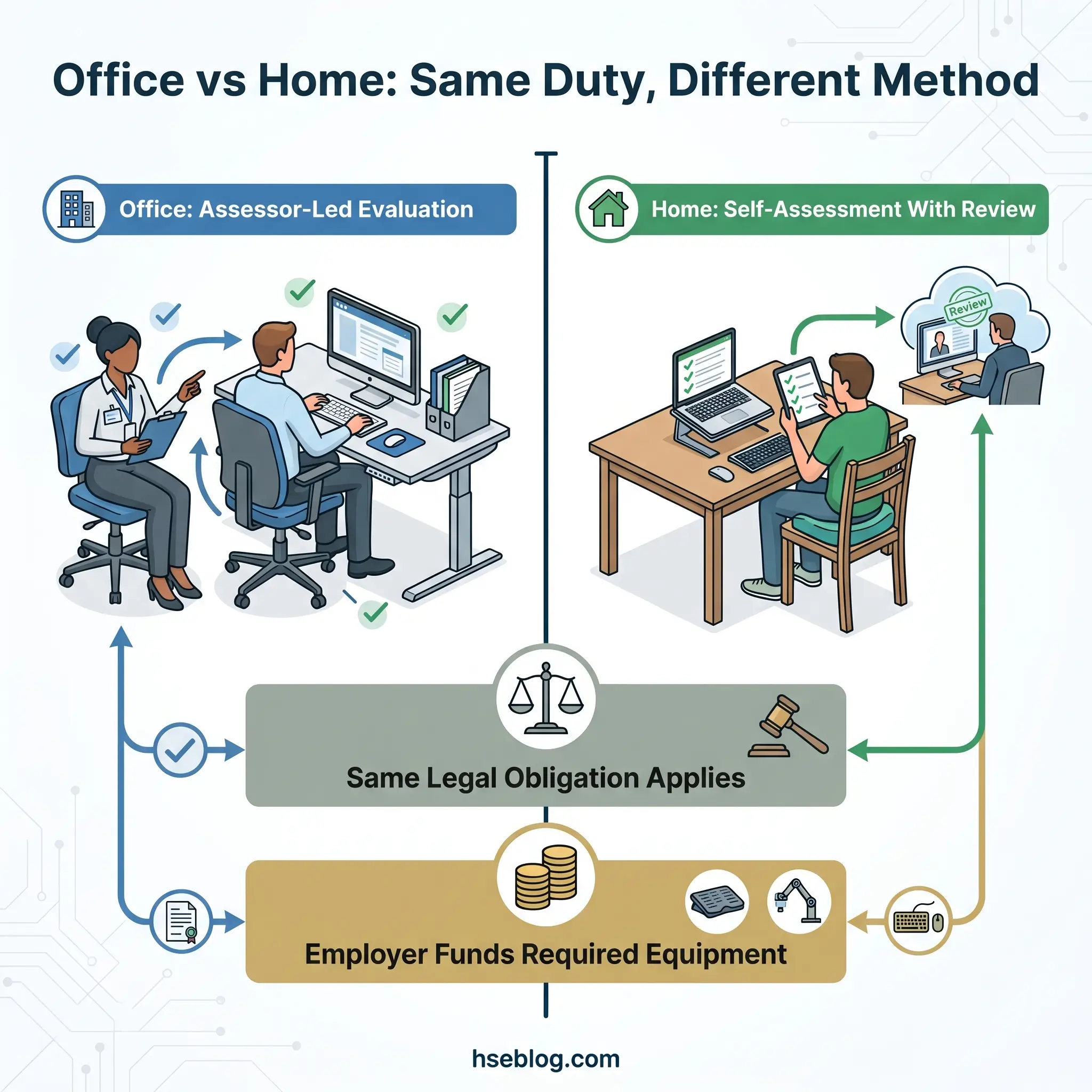
The DSE Regulations apply equally to employees working from home. There is no exemption for remote work, no reduced threshold based on location, and no provision allowing employers to treat home-based DSE users differently from office-based ones.
For hybrid workers — those splitting time between office and home — the assessment must cover both workstations. An employee with an ergonomically sound office setup and a kitchen table at home has two risk profiles, and both require assessment.
HSE guidance on DSE assessment for home workers confirms that employers do not need to visit employees' homes in most cases. Self-assessment, supported by clear instructions and training, is an accepted method. HSE recommends employers provide a suitable self-assessment checklist, ensure employees understand how to use it, and review the completed assessments to identify issues requiring action.
Where the assessment identifies that additional equipment is necessary — a separate monitor, external keyboard, suitable chair — the employer must fund it. Employees cannot be charged for equipment required to meet DSE Regulations standards, regardless of where they work. The judgment call for employers is between providing equipment directly and reimbursing employee purchases; either is acceptable, provided the equipment meets the required standard.
Research during the lockdown period demonstrated the scale of the home-working DSE problem. An IES survey found a 58% increase in neck pain, 56% increase in shoulder pain, and 55% increase in back pain among home workers compared to pre-lockdown baselines (Institute for Employment Studies, 2020). These figures reflect exactly what happens when a large workforce transitions to unassessed home workstations — dining tables, sofas, laptops without peripherals.
The biggest implementation gap in home-worker DSE is the follow-through problem. Employers send self-assessment checklists to the remote workforce. Employees complete them. The completed checklists accumulate in a shared drive. Nobody reviews the returns systematically, nobody acts on the red flags, and nobody follows up on employees who never submitted at all. A completed checklist sitting in a folder is documentation, not compliance. Compliance requires review, action, and communication back to the employee.
Temporary or short-term home working carries a lower practical threshold. HSE distinguishes between temporary arrangements — where providing guidance and encouraging good practice is proportionate — and long-term or permanent home working, where the full assessment obligation applies.
When Should DSE Assessments Be Reviewed or Repeated?
DSE assessment is not a one-off onboarding task. Workstations evolve — monitors get added, chairs get swapped informally during office moves, desks accumulate clutter that restricts movement, and employees develop habits that degrade their original setup. Periodic reassessment catches the drift that a single-point assessment misses.
The regulations do not specify a mandatory review frequency. However, they require reassessment when circumstances change significantly. The trigger events that should prompt a new or updated assessment include:
- New employee starting or moving to a new workstation — the assessment is person-specific, so a new occupant means a new assessment
- Significant equipment change — new monitor, new chair, desk relocation, addition of a second screen
- Change in work pattern — transition from office to home working, change in hours, shift from part-time to full-time screen use
- Employee reports discomfort, pain, or symptoms — this is both a trigger and a warning sign that the existing setup is causing harm
- Return from extended absence — maternity leave, long-term sickness, or any break long enough that the employee's physical needs or workstation may have changed
- Change in the employee's health condition — new diagnosis, change in vision, musculoskeletal condition, or disability that affects workstation interaction
- Office relocation or refurbishment — even if "equivalent" equipment is provided, the spatial arrangement, lighting, and environment will differ
Best practice across most organisations is an annual reassessment cycle, supplemented by the trigger-based reviews above. Annual reviews are not legally mandated, but they provide a systematic catch-all for the incremental changes that accumulate between trigger events.
Health Risks of Poor DSE Setup
The health risks motivating the DSE Regulations are well documented and, in aggregate, represent a significant burden on both workers and employers.
Musculoskeletal disorders are the primary concern. Prolonged screen work with poor posture, inadequate seating, or improperly positioned equipment contributes to back pain, neck and shoulder pain, upper limb disorders (often grouped under the term RSI — repetitive strain injury), and conditions such as carpal tunnel syndrome. These conditions develop gradually. By the time an employee reports symptoms, the poor setup has typically been in place for months — which is precisely why proactive assessment matters more than reactive response.
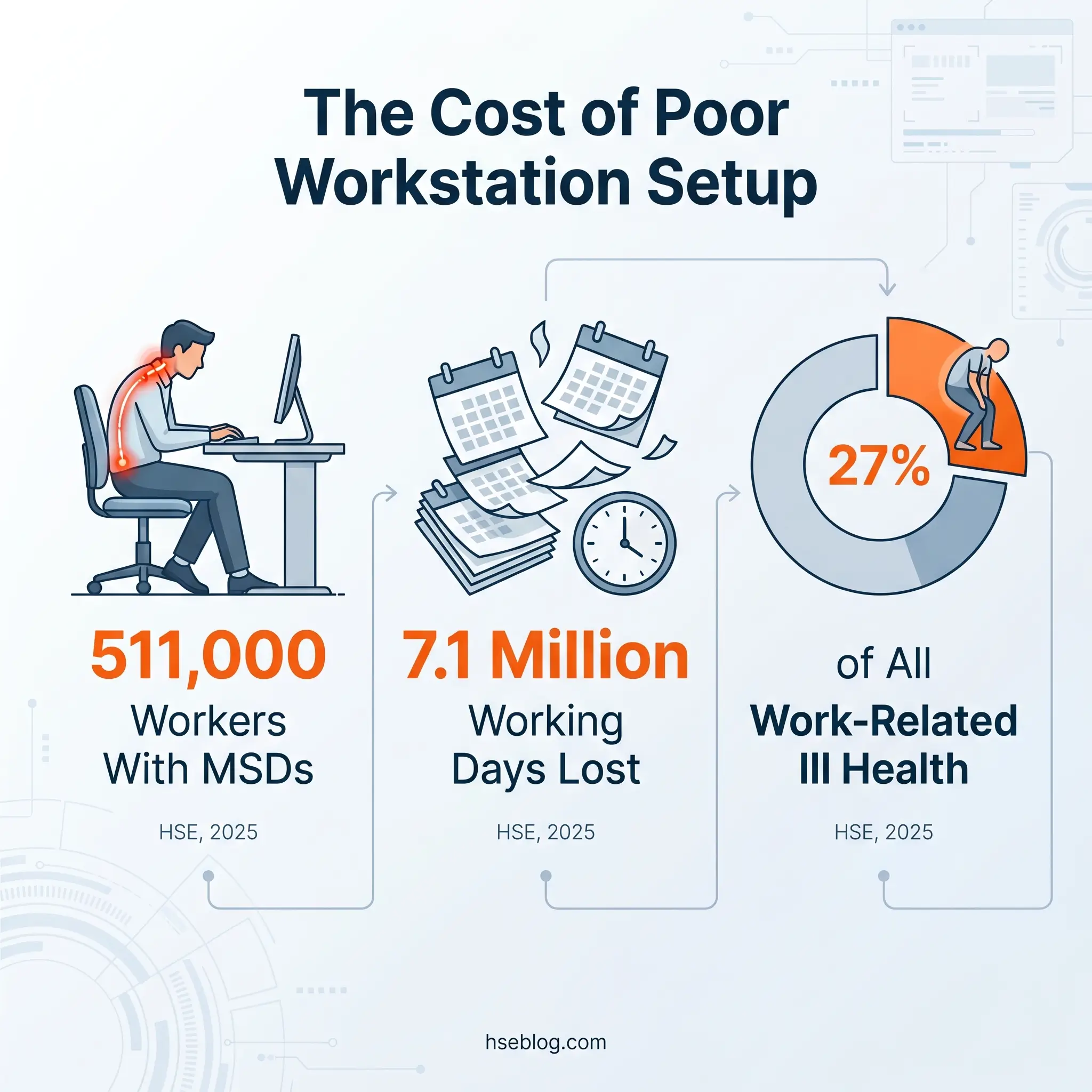
The scale of the problem is substantial. In 2024/25, 511,000 workers in Great Britain suffered from a work-related musculoskeletal disorder, representing 27% of all work-related ill health (HSE, 2025). Those conditions resulted in 7.1 million working days lost, with an average of 14 working days lost per affected worker (HSE, 2025). New MSD cases rose to 173,000, up from 168,000 the previous year — indicating that despite awareness, ongoing risk exposure continues to generate fresh injury (HSE, 2025).
Visual fatigue is the second category: tired or dry eyes, headaches, and blurred vision. These symptoms are usually temporary and resolve with breaks from screen work, but they affect productivity and comfort daily. The 20-20-20 rule — every 20 minutes, look at something 20 feet away for 20 seconds — is a widely recommended practice for reducing eye strain, though it is guidance rather than regulation.
Fatigue and mental stress represent the third category. Poorly designed software interfaces, excessive workload without breaks, and unsuitable environmental conditions (glare, noise, temperature extremes) contribute to cognitive fatigue. The regulations address these through the duty to plan breaks and ensure suitable working conditions — obligations that extend beyond the physical workstation.
The economic dimension reinforces the case. Workplace injuries and new cases of work-related ill health cost an estimated £22.9 billion annually in Great Britain (HSE, 2025, using 2023/24 data). DSE-related MSDs are a significant contributor to that figure.
Eye Tests and Employer Obligations
The employer's obligation regarding eye tests is frequently misunderstood — often because employers simply do not communicate the entitlement to their workforce.
Under Regulation 5 of the DSE Regulations, employers must provide and pay for an eye and eyesight test for any DSE user who requests one. The employee triggers the obligation by making the request; the employer cannot refuse or delay unreasonably. The test should be carried out by a qualified optometrist or doctor.
If the eye test identifies a need for corrective spectacles specifically for the DSE working distance — the intermediate focal length between reading distance and general distance — the employer must fund a basic pair. This obligation does not extend to glasses needed for general use, driving, or other non-DSE purposes. The distinction is narrow but important: the employer pays for lenses prescribed specifically because of DSE work requirements.
The most common employer failure here is not informing employees of the entitlement at all. Workers who spend years at screens without knowing they can request a funded eye test represent a latent compliance gap. When those employees eventually learn of the entitlement — often from a colleague, union representative, or during an assessment — back-dated requests and potential claims follow. Proactive communication at onboarding and during assessments prevents this entirely.
Common Mistakes Employers Make with DSE Assessments
This section addresses the implementation failures that separate organisations with genuine DSE compliance from those with the appearance of it. These patterns are consistent across the published enforcement and claims record.
- Treating the assessment as a one-off checkbox. The assessment is conducted at onboarding, filed, and never revisited. Workstations change, employees change, and the original assessment becomes irrelevant within months.
- Completing self-assessment checklists without reviewing or acting on findings. The checklist is distributed, employees complete it, and the returns are stored. Nobody analyses the results, identifies patterns, or triggers procurement for the equipment flagged as needed.
- Failing to assess home and hybrid workstations. The regulations apply regardless of location. An employer who assesses every office workstation but ignores the same employees' home setups is partially compliant at best.
- Not reassessing when significant changes occur. New equipment, office moves, role changes, returns from extended absence — each is a trigger that resets the assessment requirement.
- Providing ergonomic equipment without training users on adjustment. Monitor arms, adjustable chairs, and sit-stand desks are effective controls only when the user understands how to set them up correctly. Delivering equipment without setup guidance creates a false sense of compliance.
- Assuming no reported discomfort means no risk exists. Employees adapt to poor setups. The absence of complaints is not evidence of a safe workstation — it is often evidence that the employee has normalised discomfort or does not know how to report it.
- Not informing employees about their eye test entitlement. A silent breach that compounds over time and becomes visible only when claims surface.
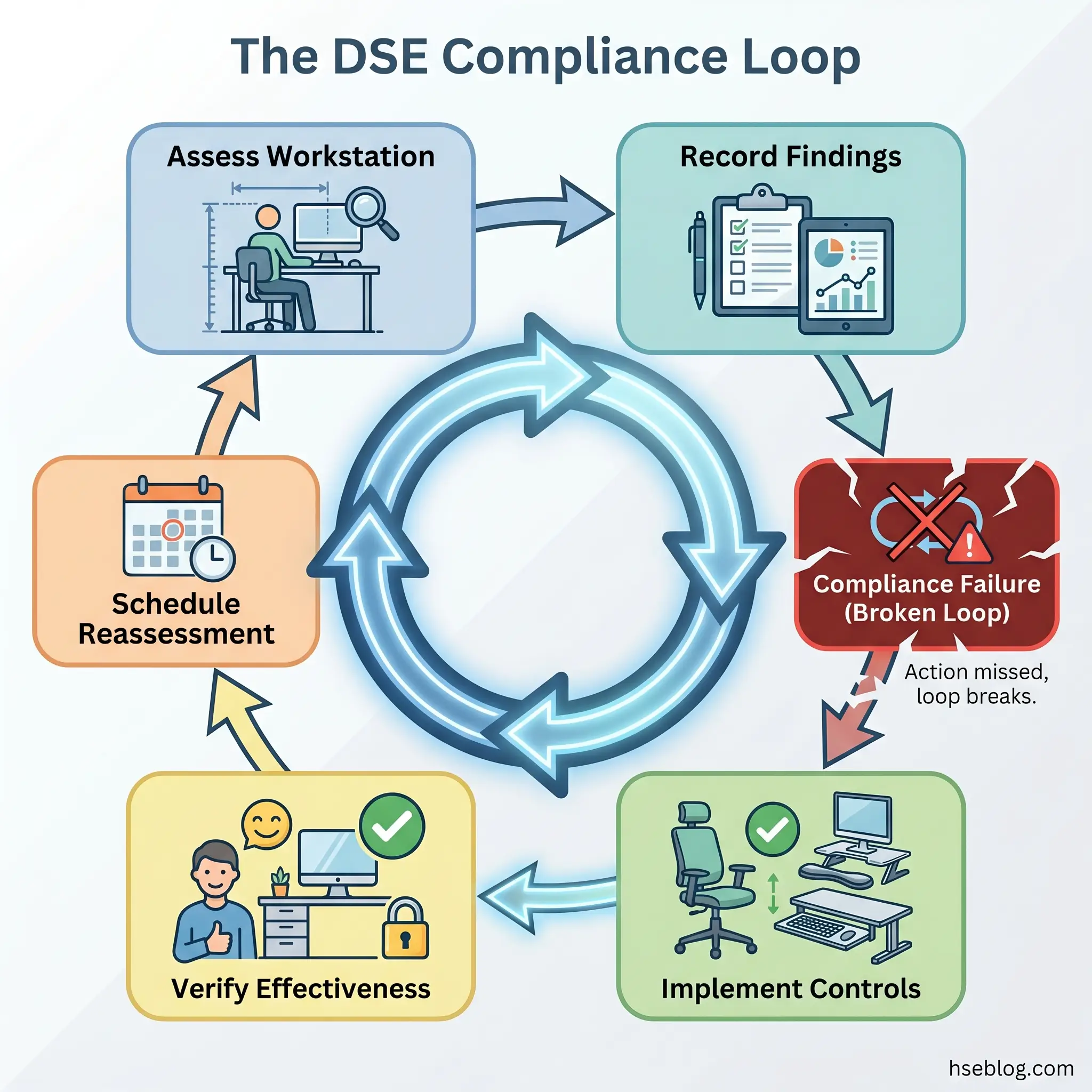
The Fix That Works: The most insidious failure mode is compliance theatre. The organisation possesses a checklist for every employee. Each checklist has been completed. The filing system is immaculate. But the findings were never actioned, the workstation conditions never improved, and the risk the assessment was designed to reduce remains exactly where it was. The document exists. The compliance does not. The fix is a closed-loop system: assessment → finding → action → verification → reassessment. If the loop is not closed, the process is administrative, not protective.
Benefits of Effective DSE Assessments
Framing DSE assessment solely as a compliance obligation undersells its value. Organisations that embed it into their broader workplace wellbeing strategy — rather than treating it as a standalone regulatory task — see measurable returns across several dimensions.
Prevention of musculoskeletal disorders directly reduces sickness absence. With an average of 14 working days lost per MSD case (HSE, 2025), even modest reductions in MSD incidence produce significant operational savings in workforce availability.
Litigation risk decreases with documented, actioned assessments. In one documented case, a freelance journalist was awarded £37,500 in compensation when her employer had not conducted a DSE assessment — a figure that far exceeds the cost of assessment and equipment provision combined. Documented assessments with evidence of follow-through are an employer's strongest defence against personal injury claims.
Productivity improves when employees work comfortably. A well-configured workstation reduces the micro-adjustments, discomfort-driven breaks, and concentration lapses that accumulate across a working day. The effect is difficult to quantify in isolation but consistently reported in workplace wellbeing literature.
Demonstrated compliance protects against HSE enforcement action. Improvement notices, prohibition notices, and associated reputational damage carry costs that dwarf the investment in a competent assessment programme.
Finally, the signal employers send matters. An organisation that takes workstation health seriously — providing assessments, acting on findings, funding necessary equipment — communicates that it values its workforce's physical wellbeing. That signal affects morale, retention, and the employer's ability to attract talent in competitive markets.
Frequently Asked Questions
How often should a DSE assessment be done?
No legally mandated frequency exists under the Health and Safety (Display Screen Equipment) Regulations 1992 (UK). Best practice is an annual reassessment cycle, supplemented by trigger-based reviews whenever a significant change occurs — new starter, workstation change, reported discomfort, return from extended absence, or transition between office and home working. The annual cycle catches incremental drift; the triggers catch acute changes. Treating assessment as a one-time onboarding task is a common compliance failure.
Can employees do their own DSE assessment?
Yes. Self-assessment is accepted by HSE, provided employees receive suitable training on how to use the assessment checklist and understand what to look for. However, self-assessment should always be reviewed by a competent person. Where an employee reports discomfort, has a pre-existing musculoskeletal condition, or has complex workstation needs (disability adaptations, multi-monitor setups), a trained assessor or occupational health referral is the appropriate route rather than self-assessment alone.
Do DSE regulations apply to tablets and smartphones?
They apply if the device is used regularly and for prolonged periods as part of work duties. The Health and Safety (Display Screen Equipment) Regulations 1992 do not list specific device types — they cover any alphanumeric or graphic display screen used as a significant part of normal work. A tablet used for two hours daily for data entry qualifies. A smartphone checked briefly for emails does not. The test is duration and regularity of use, not the device category.
Is DSE assessment required for temporary home workers?
For short-term or temporary home working, the threshold is proportionately lower — HSE guidance recommends employers provide practical advice and encourage self-assessment. For long-term or permanent home working, the full assessment obligation applies. The distinction turns on duration and regularity rather than a specific number of days. Employers should document which approach they applied and why, particularly for hybrid arrangements where the line between temporary and permanent blurs.
Who pays for DSE equipment for home workers?
The employer. If a DSE assessment identifies that additional equipment is required — a separate monitor, external keyboard, ergonomic chair — the employer must fund it. Workers cannot be charged for equipment needed to meet the standards set by the DSE Regulations, regardless of work location. The employer may provide equipment directly or reimburse purchases; either approach is acceptable provided the equipment meets the required standard.
Is there a difference between a DSE assessment and an ergonomic assessment?
A DSE assessment is a specific regulatory requirement under the Health and Safety (Display Screen Equipment) Regulations 1992, focused on display screen equipment and the surrounding workstation. An ergonomic assessment is a broader evaluation that may cover workstation design, manual handling tasks, tool design, and physical interaction with the wider work environment. A DSE assessment is one type of ergonomic assessment — narrower in scope but backed by specific legal duties that an ergonomic assessment alone does not carry.
Conclusion
Ask one question of your own organisation: when was the last time a DSE assessment finding actually resulted in a workstation change? Not a completed form. Not a filed checklist. An actual adjustment — a monitor repositioned, a chair replaced, a footrest delivered, an employee trained on how their equipment works.
If the answer is difficult to pin down, the assessment process is administrative rather than protective. The Health and Safety (Display Screen Equipment) Regulations 1992 do not require employers to generate paperwork. They require employers to identify risks and reduce them. Every step between those two points — the assessment method, the checklist design, the review process, the procurement approval — is mechanism, not outcome. The outcome is a workstation that does not injure the person using it.
With 173,000 new MSD cases reported in 2024/25 (HSE, 2025), rising even as awareness and guidance have never been more accessible, the gap between knowing what to do and doing it remains the central failure in DSE compliance. For employers navigating hybrid workforces, the challenge has multiplied — two workstations per employee, reduced visibility, self-assessment bias, and follow-through problems at scale. The organisations that close the loop — assess, act, verify, reassess — are the ones converting a 1992 regulation into genuine workforce protection.