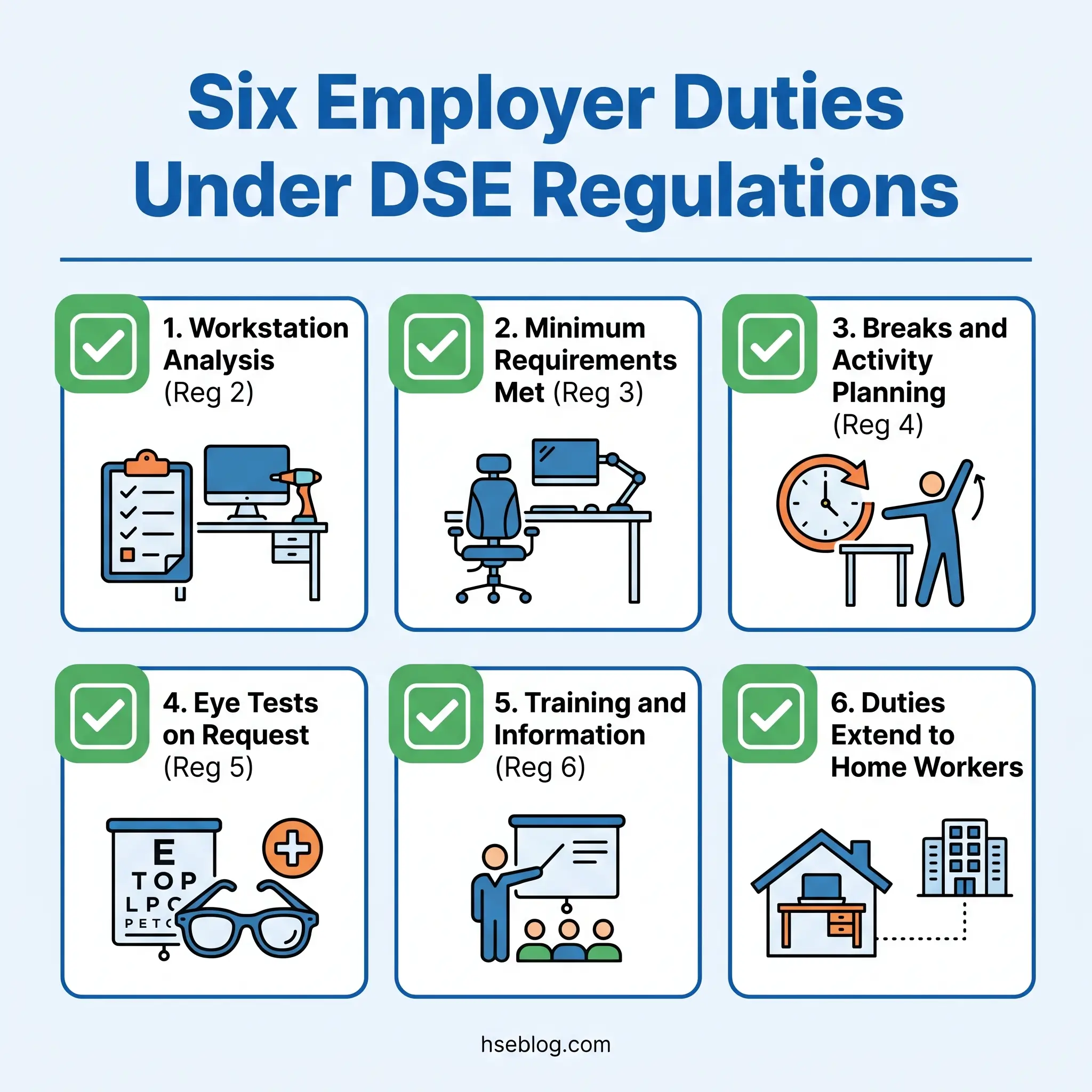
The Display Screen Equipment Regulations 1992, as amended in 2002, require UK employers to assess workstations used by habitual DSE users, ensure those workstations meet minimum ergonomic requirements, plan work to include regular breaks from screen use, provide eye and eyesight tests on request, and deliver health and safety training. These obligations apply with equal force to office-based, home-based, and hybrid workers wherever DSE use forms a significant part of normal work.
The Health and Safety (Display Screen Equipment) Regulations 1992 carry a formal name that suggests administrative procedure. The obligations they impose carry real consequences. These regulations — enacted under the Health and Safety at Work etc. Act 1974 and transposing EU Council Directive 90/270/EEC — create specific, enforceable duties on every UK employer whose workers habitually use screens. Breach is a criminal offence enforceable by HSE through improvement notices, prohibition notices, and prosecution. And in civil courts, the absence of a compliant DSE assessment has become one of the most damaging evidential gaps an employer can face when defending a musculoskeletal injury claim.
What makes these regulations unusual in the broader health and safety landscape is how many organisations they catch — and how few treat compliance seriously. An estimated 511,000 UK workers suffered from a work-related musculoskeletal disorder in 2024/25, with 7.1 million working days lost (Health and Safety Executive, 2025). A significant proportion of that burden falls on workers whose primary tool is a screen. This article sets out what the display screen equipment regulations require, who they apply to, where compliance most commonly fails, and how the obligations shift when the workstation moves from the office to the employee's home.
What Are the Display Screen Equipment Regulations?
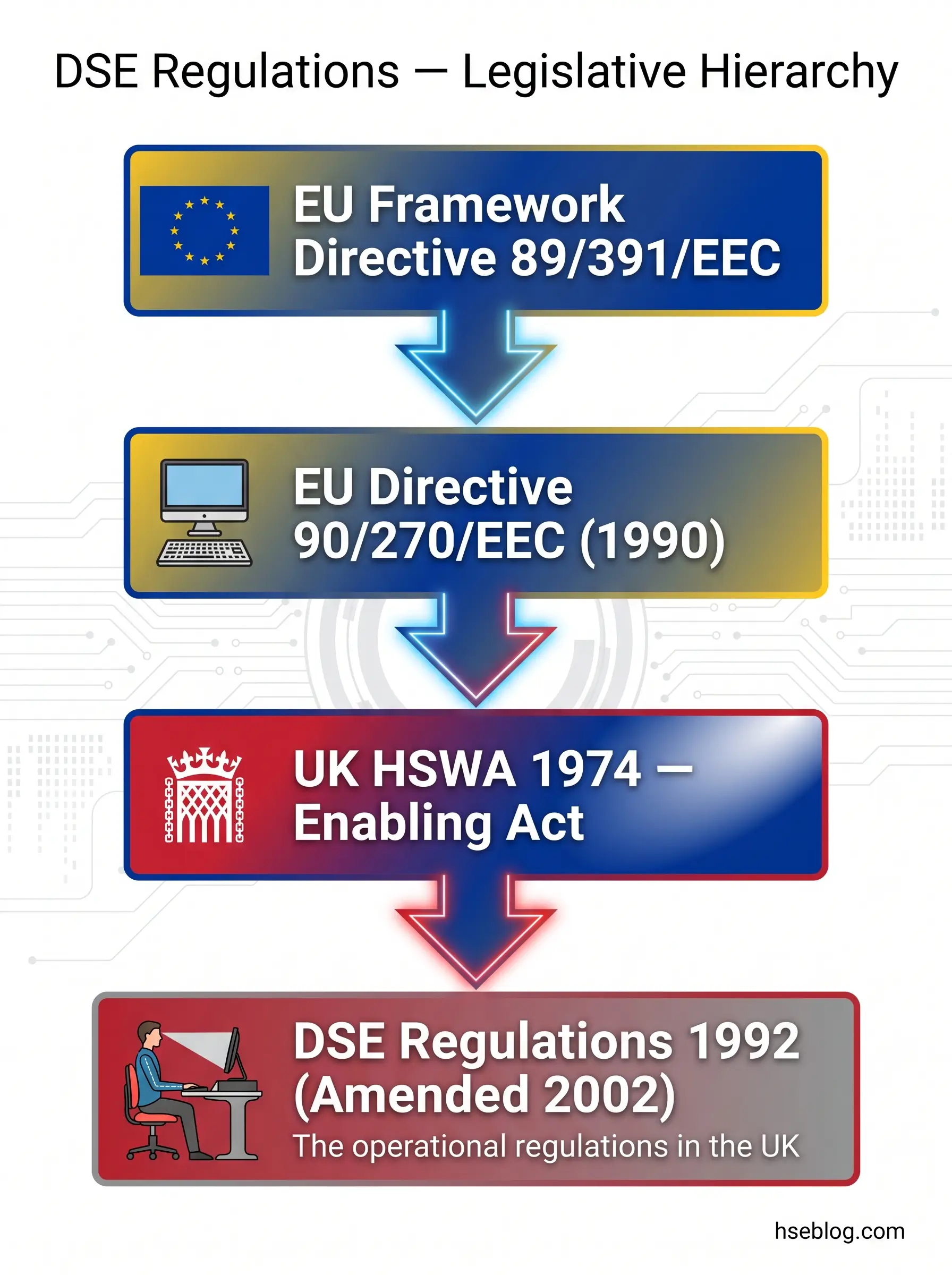
The Health and Safety (Display Screen Equipment) Regulations 1992 — commonly shortened to the DSE Regulations — are a specific set of UK health and safety regulations designed to protect workers from the health risks arising from habitual use of display screen equipment. Their full statutory reference is SI 1992/2792, and they were amended in 2002 by the Health and Safety (Miscellaneous Amendments) Regulations to extend coverage explicitly to portable devices such as laptops.
These regulations did not originate in Westminster. Their parent instrument is EU Council Directive 90/270/EEC, adopted on 29 May 1990 as the fifth individual directive under the Framework Directive 89/391/EEC. The UK transposed the directive into domestic law in 1992. Post-Brexit, the DSE Regulations remain in force as retained UK domestic law — they are no longer updated by subsequent EU amendments, but the existing obligations continue to bind employers across Great Britain. Northern Ireland operates parallel regulations under the Health and Safety (Display Screen Equipment) Regulations (Northern Ireland) 1993, with substantively identical requirements.
The overarching enabling legislation is the Health and Safety at Work etc. Act 1974, Sections 2–3, which imposes the general duty on employers to ensure, so far as is reasonably practicable, the health, safety, and welfare of employees. The DSE Regulations sit beneath this general duty as a specific, prescriptive set of obligations for a defined category of work. The full text of the Display Screen Equipment Regulations 1992 is published on legislation.gov.uk for anyone who wants to verify exact wording.
A pattern I see repeatedly in compliance audits is organisations treating the DSE Regulations as a niche concern — something relevant to a dedicated ergonomics team, not to operational management. In practice, these regulations affect virtually every office-based, hybrid, or remote worker. The scope is far broader than most compliance teams initially recognise, which is precisely why the gap between policy and implementation is so persistent.
What Counts as Display Screen Equipment?
The regulatory definition is deliberately broad: any equipment with an alphanumeric or graphic display screen. Desktop monitors, laptops, tablets, and smartphones all fall within scope — the determining factor is not the device form but the pattern of use.
The 2002 amendments settled a question that had caused years of inconsistent application by confirming that laptops and portable DSE fall within scope when used for prolonged periods. Before that amendment, some organisations argued that portability excluded a device from the regulations. That argument no longer holds.
The regulations do exclude certain categories. Equipment in drivers' cabs and on board transport is excluded. So are devices mainly intended for public operation, calculators, cash registers, equipment with small data or measurement displays, and traditional typewriters. The common thread in the exclusions is that these devices either involve transient use or serve a fundamentally different function from sustained screen-based work.
The most frequent definitional argument in practice centres on smartphones and tablets. Employers often assume these are excluded by default. The real test is duration and habitual use, not the device category. A site supervisor who checks emails on a phone for five minutes between tasks is not a DSE user. A customer service manager who spends four hours a day processing orders on a tablet is. The question is always: does this person habitually use a display screen as a significant part of their normal work?
| Covered by DSE Regulations | Excluded from DSE Regulations |
|---|---|
| Desktop monitors | Drivers' cab displays |
| Laptops (prolonged use) | Equipment on board transport |
| Tablets (habitual work use) | Calculators and cash registers |
| Smartphones (if primary work tool) | Small data/measurement displays |
| Dual/multi-monitor setups | Traditional typewriters |
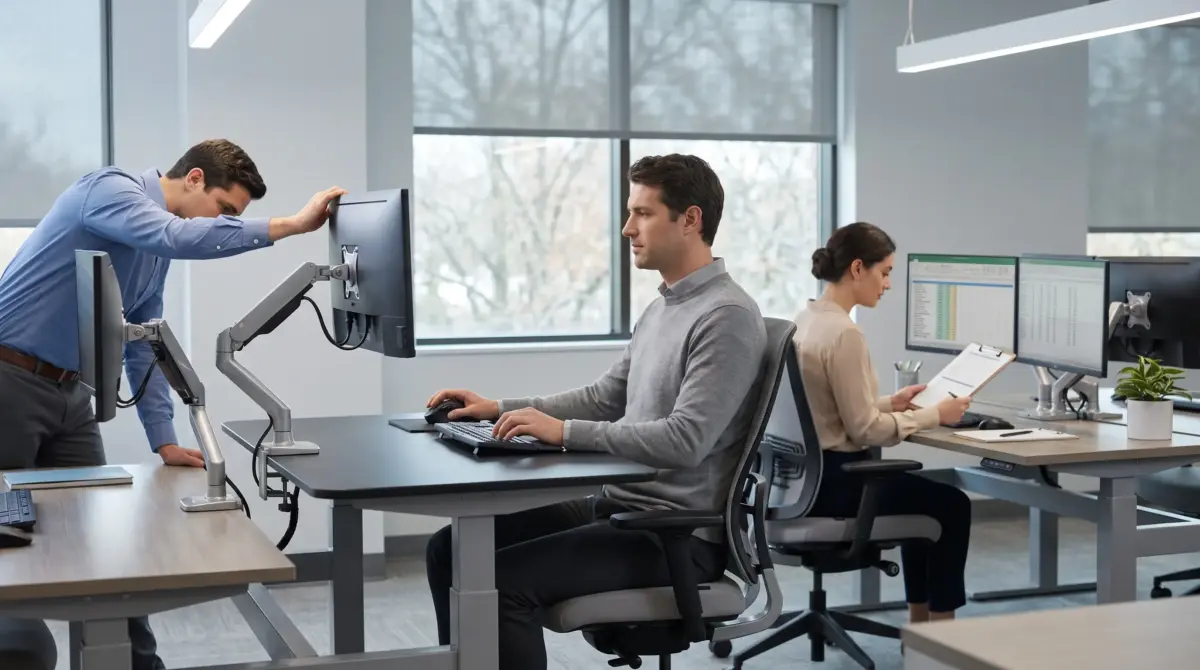
Dual-monitor and multi-screen setups deserve specific attention. The regulations apply to the workstation as a whole, and multiple screens introduce distinct ergonomic risks around head rotation, focal distance variation, and neck strain that single-screen guidance does not adequately address. An assessment must account for the specific configuration, not just confirm that a screen is present.
Who Is a DSE User Under the Regulations?
The regulations create two categories: "user" and "operator." A user is an employee who habitually uses DSE as a significant part of normal work. An operator is a self-employed person who habitually uses DSE on an employer's workstation — the duties then fall on the employer providing the workstation, not on the self-employed person.
The practical threshold is continuous or near-continuous use for an hour or more at a time, as a normal part of the working day. HSE guidance L26 provides further interpretive detail, but the core test is habitual use, not a rigid clock-based cutoff. A worker who uses a screen intensively for 45 minutes but does so every day as a core part of their role is far closer to the regulatory definition than someone who occasionally uses a screen for two hours during an unusual project.
The 2002 amendments clarified that agency workers and home workers fall within scope. This was a critical expansion — it closed the argument that working from home or working through an agency created a gap in the employer's duty.
Watch For: The most common compliance failure is under-identification of DSE users. Organisations apply the "one hour" threshold too rigidly and miss that the real test is habitual use patterns across a normal working day, not a single session measured with a stopwatch. Under-identification means under-assessment — and under-assessment is where liability begins.
Occasional users are not covered by the specific DSE Regulations, but the boundary between occasional and habitual is poorly defined and often misapplied. When in doubt, the safer compliance position is to include a worker within the scope rather than exclude them — exclusion creates risk, inclusion creates only a modest administrative burden.
What Are Employer Duties Under DSE Regulations?
This is the core of the regulatory framework. The DSE Regulations impose six principal duties on employers, each addressing a different dimension of the risk from habitual screen use.
Workstation analysis (Regulation 2) requires the employer to perform a suitable and sufficient analysis of each workstation used by a DSE user. The analysis must assess the health and safety risks and identify the steps needed to reduce those risks. This is not a general risk assessment — it is a specific workstation-level analysis covering the equipment, the furniture, the environment, the task, and the individual user.
Minimum workstation requirements (Regulation 3) require that every workstation meets the standards set out in the Schedule to the regulations. These cover the display screen itself (readable characters, adjustable brightness and contrast, stable image), the keyboard (tiltable, separate from the screen, legible key markings), the desk or work surface (adequate size, low reflectance, space for flexible arrangement), the chair (stable, adjustable seat height and backrest), the environment (adequate lighting, controlled glare and reflections, acceptable noise and heat levels), and the software interface (suitable for the task, providing feedback on system status, no undisclosed monitoring).
Break planning (Regulation 4) requires the employer to plan work activities so that DSE use is periodically interrupted by breaks or changes of activity. The regulations deliberately do not prescribe specific break durations or intervals — a point that causes more confusion than almost any other provision.
Eye and eyesight tests (Regulation 5) require the employer to arrange and pay for an eye and eyesight test on request from any DSE user, and to provide special corrective appliances if the test shows they are needed specifically for DSE work.
Training and information (Regulation 6) require the employer to provide adequate health and safety training to every DSE user, covering the risks, the controls, and the user's own role in managing their workstation.
Home and remote workers are not exempted. The employer cannot offload these obligations by virtue of the workstation being located in the employee's home. The duties extend wherever the DSE use occurs, provided the worker meets the definition of a user.
The judgment call that many organisations get wrong is treating these duties as independent compliance boxes rather than an integrated system. The workstation analysis should drive the equipment standard. The equipment standard should inform the training. The training should explain the break-planning rationale. When these duties are implemented in isolation — assessment by one team, equipment procurement by another, training by a third — gaps proliferate.
Workstation Minimum Requirements
The Schedule to the DSE Regulations specifies minimum ergonomic requirements across several categories. HSE's workstation checklist (CK1), available free from hse.gov.uk, provides a practical starting tool for verifying compliance against these standards.
The requirements are not aspirational — they are minimum legal standards. A chair that cannot be adjusted in height fails the Schedule. A screen positioned so that glare cannot be controlled fails. A desk surface too small to allow a flexible arrangement of equipment fails. Each of these failures is individually actionable.
ISO 9241-5:2024, the recently updated international standard on workstation layout and postural requirements, provides a more detailed ergonomic design framework than the Schedule itself. While ISO 9241 is not directly enforceable in UK law, it represents current best practice and is increasingly referenced in workstation procurement specifications.
Employee Responsibilities
The obligation is not entirely one-sided. Employees have duties under the regulations and under the broader Health and Safety at Work etc. Act 1974 to use DSE equipment in accordance with the training they have received, to report any discomfort or health concerns promptly, and to cooperate with the employer's risk management measures. An employer who provides a fully adjustable chair and a well-positioned screen has met its equipment duty — but if the employee consistently ignores training and works in a damaging posture without reporting it, the balance of responsibility shifts.
How to Conduct a DSE Workstation Assessment
The assessment is the regulatory cornerstone. Without it, every other duty is undermined — you cannot verify minimum requirements, identify break-planning needs, or target training effectively if you have not assessed the workstation.
A compliant DSE assessment covers five dimensions: the equipment (screen, keyboard, mouse, desk, chair), the furniture and layout (spatial arrangement, reach distances, adjustability), the environment (lighting, glare, noise, temperature, humidity), the task design (work intensity, variety, deadline pressure), and the individual user's needs — including any disability, pregnancy, or pre-existing musculoskeletal condition that affects workstation requirements.
The assessment process typically follows this sequence:
- Identify all DSE users within the organisation using the habitual-use threshold, not arbitrary job-title lists.
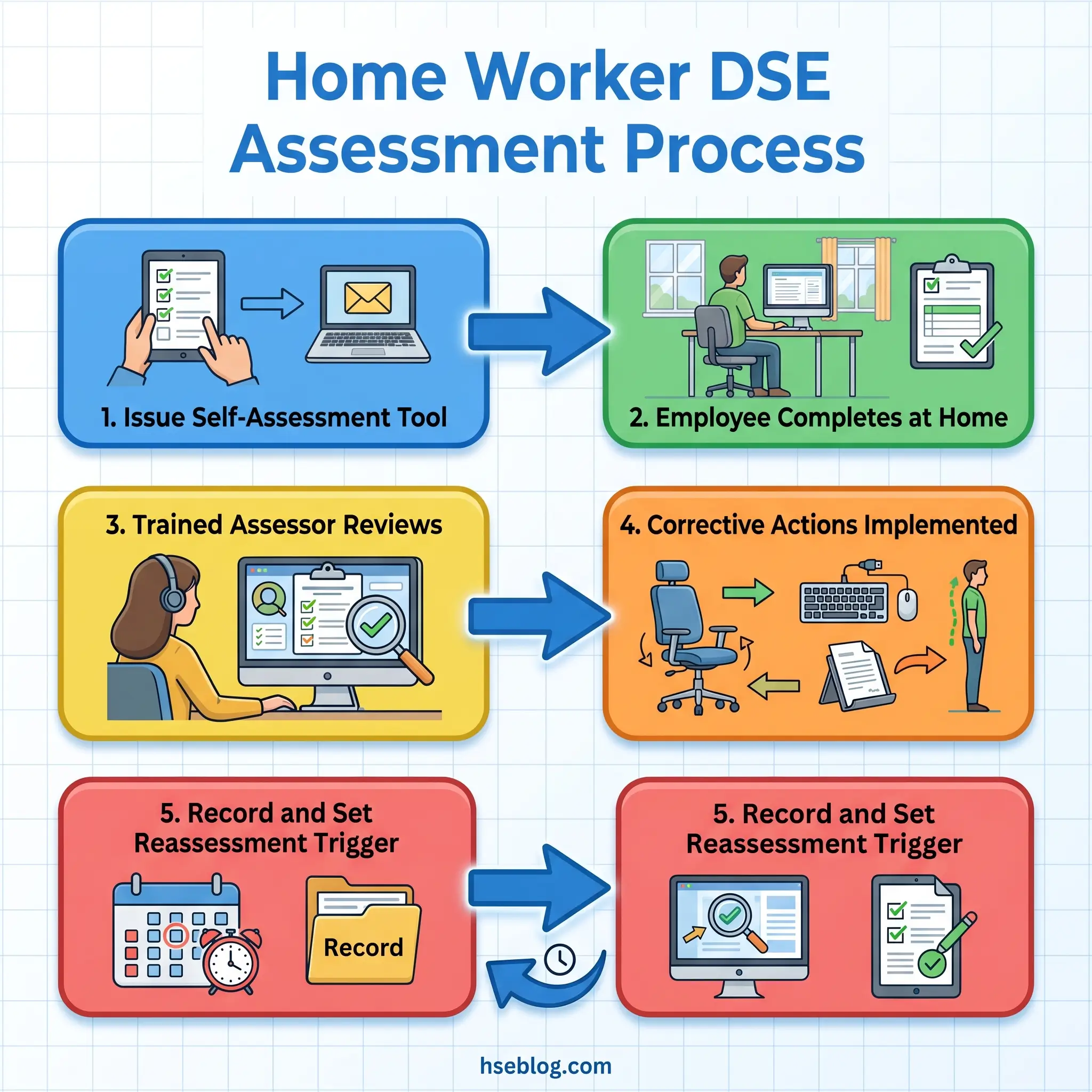
- Issue a structured self-assessment questionnaire — HSE's workstation checklist (CK1), available from the HSE guidance on DSE workstation assessment page, is the standard starting tool.
- A trained assessor reviews each completed self-assessment, identifying issues the user may not recognise — particularly posture, screen positioning relative to light sources, and chair adjustment.
- Conduct a direct workstation observation where the self-assessment flags issues or the user reports discomfort.
- Record findings, implement corrective actions, and confirm completion — the assessment is not finished until identified problems have been resolved.
- Schedule reassessment triggers rather than arbitrary calendar dates.
Software-based self-assessment tools can support this process, but they are not a complete assessment on their own. A user may answer every question in a software tool and still have a workstation that fails the minimum requirements — because the user does not know what a correctly adjusted chair looks like, or does not recognise that the overhead lighting is creating screen glare. A trained assessor must review results and apply professional judgment.
Audit Point: The most common assessment failure is treating it as a tick-box exercise completed once at induction and never revisited. Effective DSE management treats the assessment as a living process — triggered by any change in workstation, work pattern, or user condition. An assessment completed three years ago for a workstation that has since been relocated, re-equipped, and assigned to a different user is not an assessment at all.
Reassessment triggers include: a new workstation, a new user at an existing workstation, any significant workstation change (monitor replacement, desk move, chair swap), a user complaint of pain or discomfort, return from a long absence, and pregnancy.
Eye Tests and Corrective Appliances Under DSE Regulations
Regulation 5 creates a specific entitlement: any DSE user can request an eye and eyesight test, and the employer must arrange and pay for it. The test must be carried out by a competent person — a registered optometrist or medical practitioner.
The entitlement applies at three points: before commencing DSE work, at regular intervals thereafter, and if the user experiences visual difficulties that they attribute to DSE work. There is no prescribed frequency for "regular intervals" — most employers adopt a two-year cycle as reasonable practice, aligned with optometric recommendations.
If the test identifies that the user needs corrective appliances specifically for DSE work — and only for DSE work — the employer must provide a basic pair. This is the provision that generates the most persistent misconception. The obligation covers a basic pair of spectacles suitable for the screen working distance. It does not cover designer frames. It does not cover varifocals chosen for general-purpose convenience. It does not extend to general vision correction that the employee would need regardless of DSE use.
The misconception runs in both directions. Some employers assume they must fund all employee spectacles — they do not. Some employees assume any glasses purchased after a DSE eye test must be reimbursed — they cannot. The test is whether the corrective appliance is needed specifically and solely for DSE work. If the employee needs glasses for driving, reading, and general daily use, those are not a DSE obligation. If the employee has normal distance vision but needs a specific intermediate-distance correction solely for screen use, that falls within the employer's duty.
A useful jurisdictional note: this is one area where UK and broader EU requirements diverge. EU Directive 90/270/EEC (Article 9) entitles workers to an eye and eyesight test before commencing DSE work and at regular intervals. Some EU member states — Germany, for example — interpret this as requiring proactive periodic testing, not merely making tests available on request. The UK's position is reactive: the employer must provide the test when the user asks for it, but is not required to mandate testing proactively.
Work Breaks, Rest Periods, and Activity Planning
Regulation 4 requires employers to plan activities so that daily DSE work is periodically interrupted by breaks or changes of activity. The regulation contains no prescribed duration, no mandated frequency, and no specific break-to-work ratio. This is intentional — prescriptive break schedules would be impractical across the enormous range of DSE-intensive roles.
HSE guidance suggests that short, frequent breaks are more effective than infrequent long breaks. Changing activity — switching between screen-based and non-screen-based tasks — counts as a break for regulatory purposes. The point is variety, not a fixed timer.
The widely cited 20-20-20 rule (every 20 minutes, look at something 20 feet away for 20 seconds) is a practical visual-fatigue management tool, not a legal requirement. It has no regulatory standing, but it serves as useful supplementary guidance for workers who spend extended periods on detailed screen work.
The Fix That Works: In practice, the most effective approach is to design the job itself to include natural task variation rather than relying on software timers. Break-reminder pop-ups are routinely dismissed by employees under deadline pressure. If the underlying work pattern doesn't accommodate genuine activity changes, a reminder tool addresses the symptom rather than the cause. The employer's duty under Regulation 4 is to plan the work — not to install a reminder and hope for the best.
Break-monitoring software can serve as a useful prompt, but the employer retains responsibility for overall work planning. If a worker's role involves eight continuous hours of data entry with no task variation, a software reminder to "take a break" does not discharge the Regulation 4 duty — the work itself needs to be redesigned to include non-DSE activity.
Some EU member states have adopted more prescriptive approaches. The Netherlands, for instance, requires a break from screen work after a maximum of two consecutive hours. The UK's flexible approach places greater responsibility on the employer to design appropriate patterns for each role.
DSE Regulations and Home, Hybrid, and Remote Working
This is where the gap between regulatory obligation and actual practice is widest. The DSE Regulations apply with full force to home-based DSE users who habitually use screens as a significant part of their normal work. The location of the workstation does not diminish the employer's duties.
The myth that DSE regulations somehow do not apply to home workers persists despite the 2002 amendments explicitly addressing this point. It persists because compliance is harder to implement at home — the employer cannot walk around the building and observe workstations, cannot standardise furniture procurement, and cannot control environmental factors like lighting and room temperature. But difficulty of implementation does not extinguish the legal duty.
Employers must ensure home workstations are assessed. They need not physically visit the home in most cases — HSE accepts that guided self-assessments reviewed by a trained assessor are a proportionate and compliant approach. The employer provides a structured self-assessment tool, the employee completes it at their home workstation, and a trained assessor reviews the responses, follows up on issues, and records the outcome.
The data on home-working MSDs underscores why this matters. Research by the Institute for Employment Studies (IES) during the first UK lockdown found a 58% increase in self-reported neck pain, 56% increase in shoulder pain, and 55% increase in back pain among employees who transitioned to home working (IES, 2020). These figures reflected workers using kitchen tables, sofas, and makeshift desks — workstations that would fail every criterion in the DSE Schedule.
The persistent compliance gap is not the assessment itself but the follow-up. Organisations deploy a self-assessment tool, collect the results, and file them. Rarely do they act systematically on the issues identified — providing monitor risers, separate keyboards, appropriate chairs, or adjusting equipment arrangements. The assessment becomes a record of known problems rather than a trigger for corrective action. In civil liability terms, a completed assessment that identifies deficiencies and is followed by no action is arguably worse than no assessment at all — it demonstrates that the employer knew about the risk and did nothing.
Field Test: Ask your organisation one question — of the home-working DSE self-assessments completed in the last 12 months, how many resulted in a documented corrective action? If the answer is close to zero, the system is collecting data it does not use, and the regulatory duty is not being discharged.
Practical steps for genuine home-working DSE compliance include: providing clear equipment guidance with the self-assessment (not just asking questions but explaining what a compliant setup looks like), offering a budget or procurement channel for essential equipment (monitor, keyboard, mouse, chair), ensuring assessor review of every completed self-assessment within a defined timeframe, documenting corrective actions and confirming completion, and treating any reported discomfort as a reassessment trigger.
What Happens if You Don't Comply? Enforcement and Consequences
The Health and Safety Executive is the enforcement body for DSE regulations in the UK. HSE inspectors hold powers to issue improvement notices (requiring specific corrective action within a set timeframe), prohibition notices (stopping an activity until a risk is controlled), and to initiate prosecution for regulatory breaches.
Non-compliance with the DSE Regulations is a criminal offence. Prosecution can result in unlimited fines under current sentencing guidelines. However, the practical enforcement reality is that HSE rarely prosecutes solely for DSE failures — the more common enforcement path is an improvement notice triggered during a broader workplace inspection or following an employee complaint.
The greater financial and legal exposure for most employers lies not in criminal prosecution but in civil liability. Employees who develop musculoskeletal disorders, repetitive strain injuries, or visual problems attributable to DSE work can bring personal injury claims. In these claims, the DSE assessment — or its absence — is typically the first document a solicitor requests.
The consistent pattern in civil claims is not that employers had no system at all, but that the system existed on paper and failed at implementation. Corporate policy stated that DSE assessments were mandatory. HR had a self-assessment tool. But individual workstations were never assessed, or assessments were completed years earlier and never updated, or identified deficiencies were never corrected. The gap between corporate policy and individual workstation reality is where liability crystallises.
The annual cost of workplace injuries and ill health in the UK is estimated at £22.9 billion (Health and Safety Executive, 2025). Musculoskeletal disorders are the largest single category of work-related ill health, with 511,000 workers affected and 7.1 million working days lost in 2024/25 (HSE, 2025). The prevalence rate stands at 1,470 per 100,000 workers (HSE, 2025). While not all MSDs are DSE-related, the contribution of sedentary screen work to upper-limb, neck, shoulder, and back disorders is well-established in the occupational health literature.
How DSE Regulations Compare Internationally
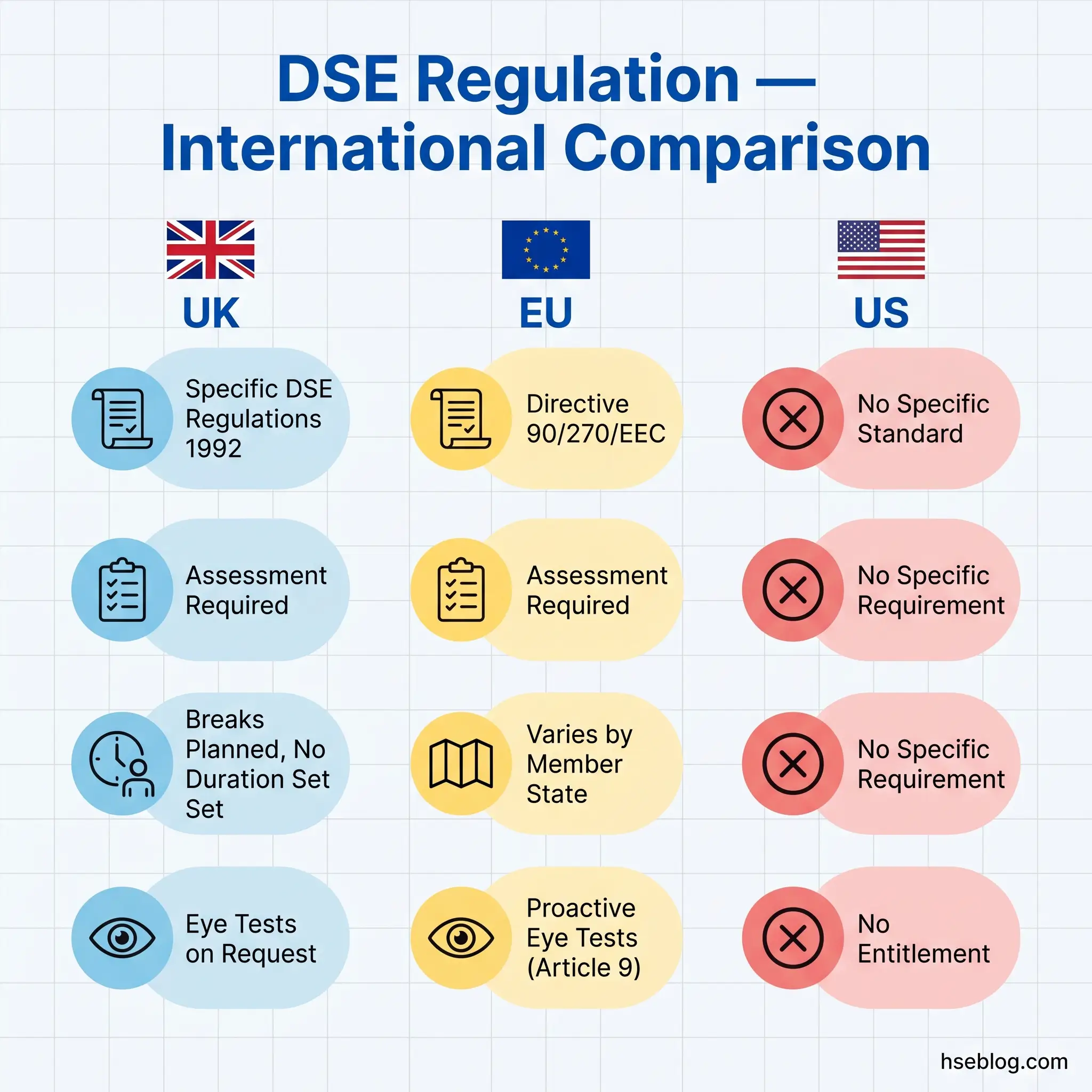
The UK's position of having a named, specific regulation with defined employer duties for display screen equipment is unusual in the international landscape. A brief comparison reveals how different jurisdictions approach the same risk.
| UK | EU | US | |
|---|---|---|---|
| Specific DSE standard? | Yes — DSE Regulations 1992 | Yes — Directive 90/270/EEC (transposed nationally) | No specific standard |
| Legal instrument | SI 1992/2792 | Council Directive 90/270/EEC | General Duty Clause, OSH Act §5(a)(1) |
| Workstation assessment required? | Yes (Regulation 2) | Yes (Article 3) | No specific requirement |
| Break requirements | Planned breaks, no duration prescribed | Varies by member state (e.g., Netherlands: break after 2 hours max) | No specific requirement |
| Eye-test entitlement | On request from DSE user | Before commencing DSE work + periodic (Article 9) | No entitlement |
| Enforcement | HSE — improvement/prohibition notices, prosecution | National enforcement bodies | OSHA — General Duty Clause citations |
EU Directive 90/270/EEC is the parent instrument from which the UK regulations were transposed. Individual EU member states have transposed it with national variations — the Netherlands prescribes a maximum of two consecutive hours of screen work before a break, while other member states leave break patterns flexible. The European Commission is currently reviewing Directive 90/270/EEC under the EU Strategic Framework on Health and Safety at Work 2021–2027, with a complementary study by the Spark Legal/Deloitte/Panteia consortium examining whether the 1990 directive adequately addresses modern technologies — multi-screen setups, tablets, smartphones — and contemporary working patterns such as remote and hybrid work. The outcome of this review may result in a modernised directive that the UK, post-Brexit, would not be obliged to follow but would be wise to monitor.
In the United States, OSHA has no specific standard for computer workstations or display screen equipment. Ergonomic risks from screen work are addressed through the General Duty Clause — Section 5(a)(1) of the OSH Act — which requires employers to keep workplaces free from recognised serious hazards. OSHA provides voluntary guidance on computer workstation safety through its published resources on the topic, but these are advisory rather than enforceable. The practical result is that US employers face far less prescriptive regulation of screen work than their UK or EU counterparts.
ISO 9241, the international standard series on ergonomics of human-system interaction, provides the design-standard layer that sits alongside (not instead of) legal requirements. ISO 9241-5:2024, updated from the 1998 edition, addresses workstation layout and postural requirements. While not directly enforceable, ISO 9241 is increasingly referenced in procurement specifications and is useful as an objective benchmark when specifying new equipment or evaluating existing workstations.
The UK's regulatory specificity creates compliance clarity that the US General Duty Clause approach lacks. An employer who follows the DSE Regulations and their supporting guidance (L26) knows precisely what is required. An employer relying on the General Duty Clause must interpret a broad obligation against evolving ergonomic best practice — clearer perhaps in principle, but harder to operationalise and harder for regulators to enforce against specific workstation failures.
Frequently Asked Questions
Do DSE regulations apply to self-employed people?
The regulations distinguish between "users" (employees) and "operators" (self-employed persons working on an employer's workstation). If a self-employed contractor habitually uses DSE on a client's premises, the client — as the employer providing the workstation — holds the duties. A self-employed person working alone on their own equipment is not covered by the specific DSE Regulations, but general health and safety duties under the Health and Safety at Work etc. Act 1974 still apply.
How often should a DSE assessment be repeated?
No fixed frequency is prescribed in the regulations. Reassessment is trigger-based, not calendar-based: a new workstation, a new user, a significant change to the workstation setup, a user complaint of discomfort, return from a long absence, or pregnancy all require fresh assessment. Many organisations adopt an annual review as good practice, but the legal requirement is responsiveness to change, not a fixed schedule.
Do employers have to pay for glasses under DSE regulations?
Only if an eye test identifies that corrective appliances are needed specifically for DSE work. The employer's duty covers a basic pair suitable for the screen working distance — not designer frames, not varifocals for general use, and not spectacles the employee would need regardless of screen work. The test is whether the correction is needed solely because of DSE use.
Can an employee refuse to complete a DSE self-assessment?
Employees have a duty under health and safety legislation to cooperate with reasonable employer measures. A self-assessment is a widely accepted and proportionate method. However, if an employee cannot or will not complete one — whether due to disability, language barriers, or refusal — the employer retains the duty to ensure an assessment is carried out by alternative means, such as a direct assessor visit or an assisted assessment.
Do DSE regulations apply to dual monitors or multiple screens?
Yes. The regulations apply to the workstation as a whole, and multiple screens are assessed as part of that workstation. Dual monitors introduce specific ergonomic risks — excessive head rotation, inconsistent focal distances, and uneven neck loading — that single-screen guidance does not address. The assessment must evaluate the specific multi-screen arrangement and identify any adjustments needed to minimise postural strain.
Is there a legal requirement for a standing desk under DSE regulations?
No. The regulations require workstations to meet minimum ergonomic requirements and for work to be planned with breaks and activity variation. A standing desk or sit-stand desk may be recommended through the assessment process for an individual user, but it is a means of compliance, not a mandatory requirement. The legal obligation is an ergonomically adequate workstation and varied work patterns — how the employer achieves that is a matter of practical judgment.
Conclusion
The pattern that runs through most DSE compliance failures is not ignorance of the regulations — it is the distance between policy and practice. Organisations purchase self-assessment software, draft DSE policies, and include workstation awareness in induction training. Then the system stalls. Assessments are completed and filed without review. Flagged issues sit in a database. New starters use inherited workstations that were last assessed for someone with a different build, different eyesight, and a different monitor. The regulations themselves are clear and well-structured; what fails is the sustained attention needed to make them work at individual workstation level.
The single highest-impact change an organisation can make is closing the loop between assessment and action. Every completed assessment should result in either a confirmed-compliant outcome or a documented corrective action with a completion date. That discipline — applied consistently to office, home, and hybrid workstations — addresses the regulatory duty, reduces MSD risk, and removes the evidential weakness that makes civil claims so damaging. With 511,000 UK workers reporting musculoskeletal disorders in 2024/25 (HSE, 2025) and the European Commission actively reviewing whether Directive 90/270/EEC remains fit for modern working patterns, the regulatory framework around display screen equipment is not fading into irrelevance. It is becoming more scrutinised.
The question is not whether your organisation has a DSE policy. The question is whether the last person to sit down at a workstation in your organisation had that workstation assessed, and whether anything was done about the result.