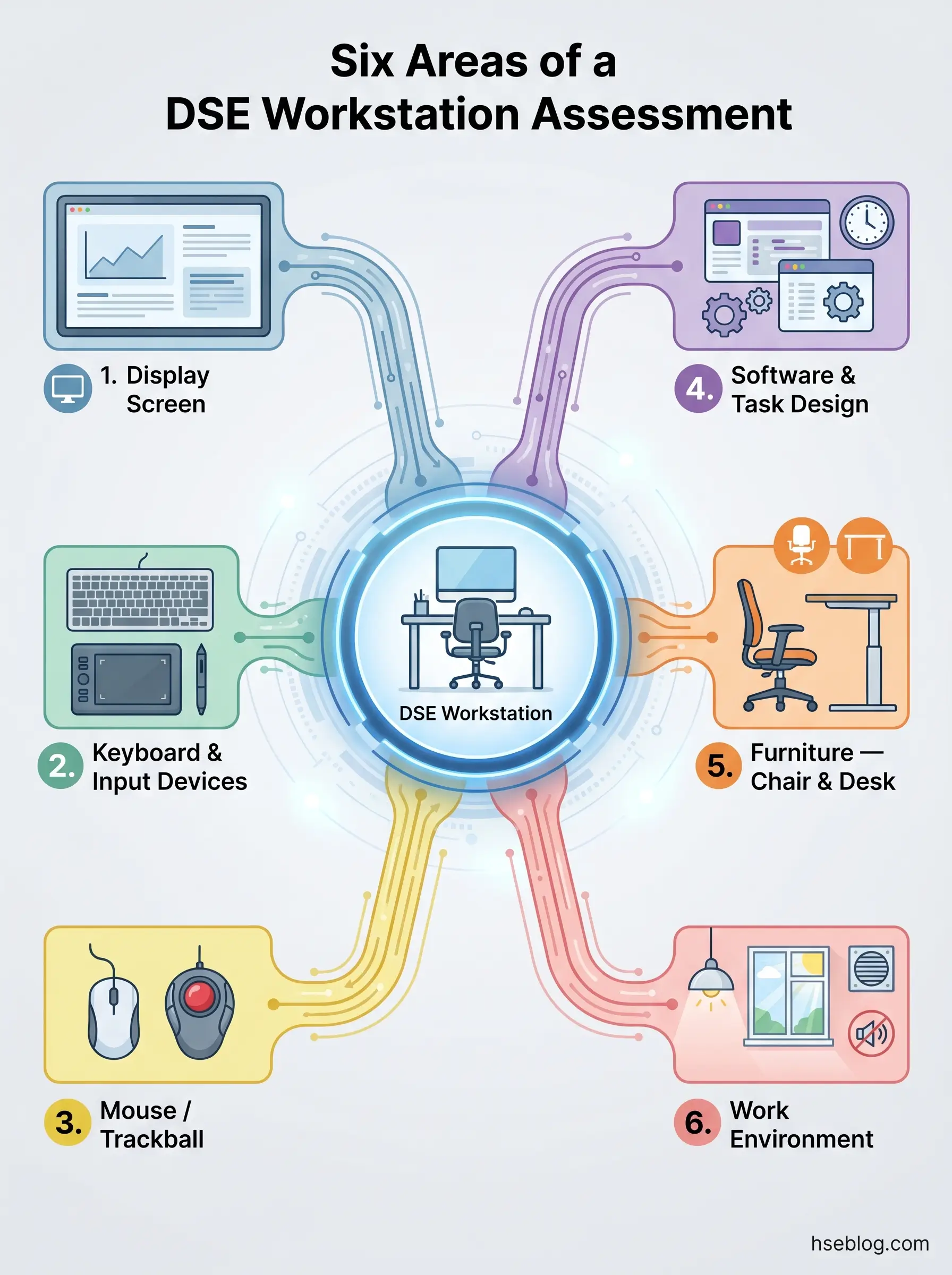
A DSE risk assessment checklist should cover six core areas defined by the HSE's CK1 template (UK): display screen position and clarity, keyboard and mouse placement, software suitability and break planning, furniture adjustability and desk space, work environment factors including lighting and temperature, and individual user considerations such as existing health conditions and training needs. The checklist is an aid to a trained assessor's judgement — not a standalone compliance document.
Some 511,000 workers in Great Britain were suffering from a work-related musculoskeletal disorder during 2024/25, with 173,000 of those cases newly developed that year — an increase on the previous period (HSE, 2025). Upper limb and neck disorders accounted for 41% of all MSD cases (HSE, 2025), a body-area profile that maps directly onto the risks created by poorly set-up display screen equipment workstations.
Those numbers represent real people dealing with pain that a structured workstation assessment could have prevented or reduced. This article walks through what a DSE risk assessment checklist must cover under UK law, what each checklist area actually requires from the assessor beyond a yes/no tick, and how the same framework applies when your workforce splits time between office and home. The goal is practical: a reference that turns checklist compliance into genuine risk reduction.
What Is a DSE Risk Assessment Checklist?
A DSE risk assessment checklist is a structured evaluation tool designed to assess every element of a display screen equipment workstation against the minimum requirements set out in the Schedule to the Health and Safety (Display Screen Equipment) Regulations 1992 (UK). It is not a generic office risk assessment. Its focus is specific: the six risk-factor categories that determine whether a workstation is likely to cause musculoskeletal injury, eye strain, or fatigue over sustained use.
The term "DSE" covers any device with an alphanumeric or graphic display screen — desktop monitors, laptops, tablets used for prolonged work. A "workstation" under the Regulations means the entire assembly: screen, input devices, software, chair, desk, and the immediate working environment. The HSE's CK1 checklist is the official UK reference template, covering display screen, keyboard and input devices, mouse/trackball, software, furniture, and environment.
A critical distinction that many organisations miss: the checklist is an aid to assessment, not the assessment itself. HSE's L26 guidance (UK) makes clear that a trained assessor must review the findings, observe the workstation in use where practicable, and ensure corrective actions are implemented. The pattern where employers distribute a self-assessment questionnaire to staff, collect the completed forms, and file them as "assessments done" is one of the most persistent compliance failures in UK DSE management. A returned form with no assessor review, no follow-up, and no action tracking is not a completed assessment — it is an administrative record with no risk-reduction value.
Who Needs a DSE Risk Assessment — and When?
The legal threshold is lower than many employers assume. Under Regulation 2 of the DSE Regulations 1992 (UK), any employee who uses display screen equipment daily for continuous periods of an hour or more as a normal part of their work qualifies as a "DSE user." That definition captures the vast majority of office-based, administrative, design, and IT roles — and increasingly, roles in operations, logistics, and project management where screen-based work has expanded.
Once someone meets that threshold, their employer must assess the workstation they use. The assessment is not a one-off event. Specific triggers require a new or updated assessment, and missing these triggers is where many organisations fall out of compliance.
The following events should each prompt reassessment:
- New starter or role change — the user is working at an unfamiliar workstation or performing different tasks
- New or changed equipment — a different monitor, chair, desk, or input device alters the ergonomic profile
- Change in work location — moving desks, relocating to a different office, or beginning hybrid/home working
- User reports discomfort or pain — this is both a trigger for reassessment and a potential early indicator of an MSD
- Significant change in work pattern — increased hours, different tasks, or a shift from office-based to hybrid working
- Pregnancy — postural requirements change as pregnancy progresses, and the workstation may need adjustment at multiple stages
- Return from long absence — particularly after an MSD-related absence, where the original workstation setup may have contributed to the condition
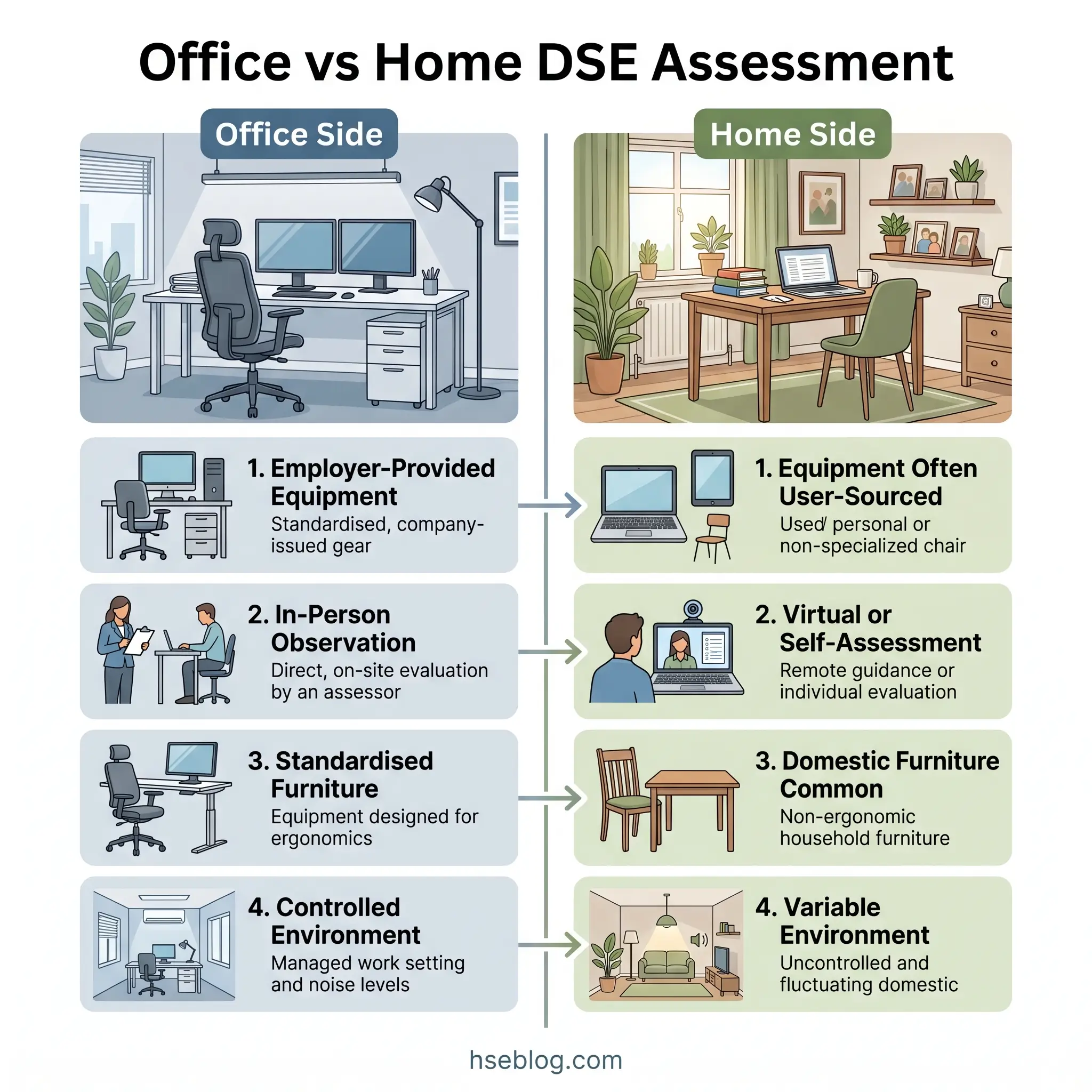
The same legal duties apply regardless of where the work takes place. An employee working from home three days a week is entitled to the same assessment quality as one working full-time in the office. In practice, however, this is the highest-risk blind spot in many organisations' DSE compliance. The office workstation receives a formal assessment with an assessor present. The home workstation — where the employee may be working from a dining table with a laptop balanced on books — often goes entirely unassessed, or receives only a cursory self-assessment with no follow-up.
What Should a DSE Risk Assessment Checklist Cover? The Six Core Areas
The HSE's CK1 checklist (UK) structures the assessment around six risk-factor categories. Each category contains specific prompts, but the most common assessor error is treating those prompts as binary pass/fail items. A workstation can technically tick every box and still present genuine risk. A chair may be "adjustable" — but if the user has never been shown how to adjust it, or has set it at the wrong height for their desk, the risk remains. The assessor's role is to interpret findings, not just record them.
Display Screen
Screen assessment covers character legibility, image stability, brightness and contrast adjustability, and — critically — screen positioning relative to the user. The top of the viewable area should sit at or slightly below the user's natural eye level when seated upright. Viewing distance should be roughly arm's length. These two parameters alone prevent the majority of neck-flexion and eye-strain complaints.
Glare and reflections are the next priority. The screen should not face a window or sit directly beneath unshielded fluorescent lighting. Tilt and swivel adjustability allow the user to fine-tune position relative to light sources, but if the workstation layout forces the screen into a glare path, adjustability cannot compensate — the desk needs repositioning.
Multi-monitor setups introduce additional assessment points. The primary screen should be centred in front of the user, with secondary screens angled so the user can view them without sustained neck rotation. An increasingly common finding: users with dual monitors position both symmetrically, forcing constant head-turning to both sides rather than centring on the screen they use most.
Screen cleanliness is a readability factor that assessors frequently overlook. Dust and fingerprints reduce contrast and force users to lean forward or increase brightness beyond comfortable levels.
Keyboard and Input Devices
The key requirement under the Regulations is that the keyboard must be separable from the screen, tiltable, and have a matt surface finish with legible key markings. For desktop users with a separate keyboard, this is usually straightforward. For laptop users, it is almost never compliant without additional equipment — the integrated keyboard and screen cannot be independently positioned, making a separate keyboard and laptop stand (or external monitor) essential for any prolonged use.
Sufficient desk space in front of the keyboard matters more than many assessors realise. The user needs enough flat surface to rest their forearms or wrists when not actively typing. A keyboard pushed to the desk edge with no support space encourages elevated wrists and sustained shoulder tension — a direct pathway to upper limb disorders.
Mouse positioning is equally important. The mouse should sit at the same height as the keyboard and close enough that the user does not have to reach or extend their arm to use it. Users who develop wrist or forearm pain should be offered alternative input devices — a vertical mouse, trackball, or touchpad — as part of the corrective action from the assessment.
Software and Task Design
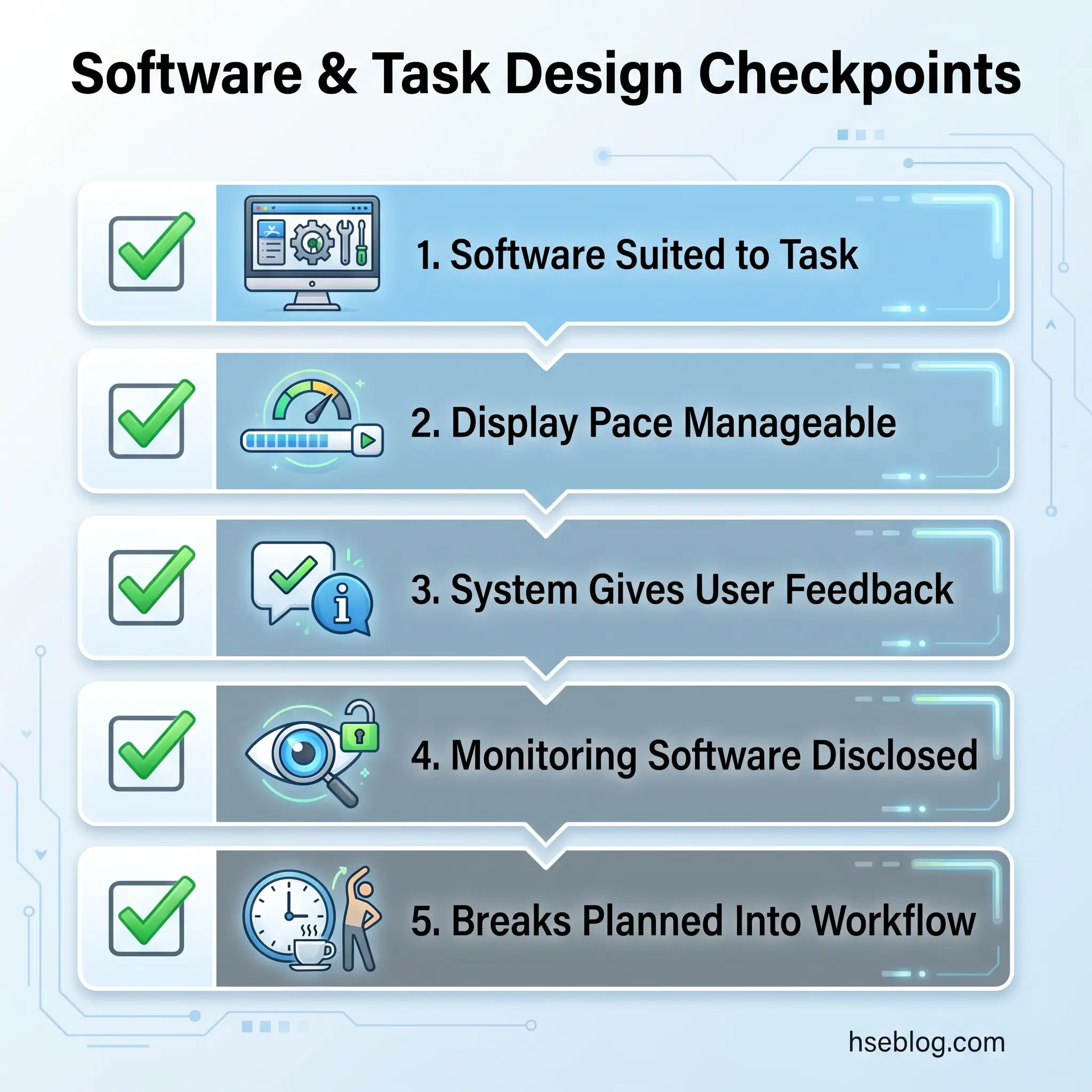
This is the checklist area that most assessors rush through or skip entirely. The Regulations require that software is suitable for the task, displays information at a pace the user can manage, and provides adequate feedback. In practical terms, the assessor should consider whether the user is struggling with a system that forces repetitive awkward inputs, whether the screen layout requires excessive scrolling or window-switching, and whether any monitoring software is being used without the user's knowledge.
Task design is part of this category. No DSE user should work continuously at a screen for more than 60 to 90 minutes without a break or change of activity. The break does not need to be a formal "rest break" — it can be a different work task that takes the user away from the screen. The critical point is that break scheduling must be planned into the work, not left for the user to self-manage under workload pressure. Assessors should ask how long the user typically works without a screen break, and whether their role allows them to take those breaks in practice.
Furniture — Chair, Desk, and Accessories
Furniture is typically the assessment area with the most corrective actions, and for good reason — it is where the physical interface between the user and the workstation is most direct. The chair assessment should verify adjustable seat height, adjustable backrest height and tilt angle, adequate lumbar support, and a stable five-star base with castors appropriate for the floor surface. The judgement call for assessors is not simply "is it adjustable?" but "is it adjusted correctly for this user right now?"
The desk needs sufficient surface area for all equipment and documents, adequate legroom beneath, and a matt finish to avoid reflections. Cramped desks force users to position equipment too close or stack items, creating awkward reaching patterns. Where the desk surface is too high or too low relative to the adjusted chair, a height-adjustable desk or desk riser should be considered.
Two accessories deserve specific attention. A footrest is required for any user whose feet do not rest flat on the floor once the chair is adjusted to the correct height for the desk. This is common for shorter users and is one of the most frequently missed corrective actions. A document holder reduces neck rotation for users who frequently reference paper documents while typing — without one, the user repeatedly turns and tilts their head between a flat document and an upright screen, loading the neck asymmetrically.
Work Environment — Lighting, Temperature, Noise, Humidity
Environmental factors affect DSE work quality and user comfort, and they are among the hardest elements to assess in home-working contexts because the employer has limited control over the domestic environment.
Lighting should be adequate for the task without creating screen glare. Adjustable window coverings and supplementary task lighting give the user control over their light environment. Overhead fluorescent lights positioned directly above the screen are a common glare source in office settings. At home, the most frequent issue is a screen positioned facing or backing onto a window, creating either direct glare or a high-contrast backlight that strains the eyes.
Temperature and humidity should be comfortable — the Approved Code of Practice for the Workplace (Health, Safety and Welfare) Regulations 1992 (UK) suggests a minimum of 16°C for office work, but DSE users also need adequate ventilation and humidity to avoid dry-eye symptoms from prolonged screen use.
Noise from equipment — printer hum, fan noise from a desktop unit, or a noisy air conditioning system — should not be distracting or disturbing to concentration. Space around the workstation must allow the user to change position and move freely. Cable management is a practical safety point: trailing cables from monitors, chargers, and peripherals create trip hazards, particularly in home setups where cables may cross walking routes.
Individual User Factors
The generic checklist captures workstation and environment, but the assessment is incomplete without consideration of who is using the equipment. Users with existing musculoskeletal conditions, repetitive strain injuries, or visual impairments may require reasonable adjustments that go beyond standard workstation setup — specialist keyboards, ergonomic mice, screen magnification software, or adjusted work schedules.
Pregnant workers need reassessment as their posture changes through pregnancy. The chair, desk height, and monitor position that worked at 12 weeks may be inadequate at 30 weeks.
Disability accommodations should be identified during the assessment and actioned through the employer's reasonable-adjustment process. Assistive technology — voice recognition software, screen readers, alternative input devices — may be required, and the assessor should flag these needs even if they cannot specify the solution.
A dimension that the CK1 checklist does not explicitly address but L26 guidance (UK) supports: user training. The best-adjusted workstation loses its protective value if the user does not know how to maintain the correct setup day to day. The assessment should confirm whether the user has received DSE awareness training, understands how to adjust their own chair and screen, and knows how to report discomfort early.
How to Conduct the Assessment: Step-by-Step Process
Having a checklist is necessary but not sufficient. The assessment process determines whether the checklist produces genuine risk reduction or sits in a folder as a compliance artefact. The HSE's five-step risk assessment approach applies directly to DSE, with adaptations specific to workstation evaluation.
- Identify all DSE users across the organisation. This includes office-based, hybrid, remote, and home workers. The common gap: temporary staff, contractors, and agency workers using employer-provided workstations are often excluded from the assessment programme despite being covered by the Regulations.
- Assess each workstation using the checklist as a structured guide. The assessor should observe the user at their workstation wherever possible — not simply hand over a form. Watch how they sit, where their eyes track, whether they reach for the mouse, whether their feet touch the floor. Self-assessment questionnaires can initiate the process, but the assessor must review responses, follow up on any identified issues, and conduct observation where risk factors are reported.
- Evaluate the risks identified. Not every checklist finding carries equal weight. A slightly dusty screen is a minor housekeeping point. A non-adjustable chair combined with a desk at the wrong height and no footrest is a compound risk that will likely produce symptoms within weeks. The assessor should prioritise by severity and likelihood.
- Record findings, assign corrective actions with named responsibilities and deadlines. Under the Management of Health and Safety at Work Regulations 1999 (UK), Regulation 3, employers with five or more employees must record the significant findings of their risk assessments. Each corrective action needs an owner and a completion date — without these, actions drift indefinitely.
- Review regularly and when circumstances change. Annual review is the recommended minimum cycle. Reassessment triggers (new equipment, change of location, reported discomfort, pregnancy, return from absence) should prompt immediate action outside the scheduled cycle.
The most common breakdown occurs between steps four and five. Actions are recorded during the assessment but never tracked to completion. Review dates are set but not calendared. Six months later, the footrest that was ordered has not arrived, the screen riser is still in its box, and the user has developed the symptoms the assessment was supposed to prevent.
Audit Point: When reviewing an organisation's DSE programme, check not just whether assessments exist but whether corrective actions have documented completion dates and sign-off. A file of completed checklists with no action-tracking record is a programme that identifies risk without reducing it.
DSE Assessment for Homeworkers and Hybrid Workers
Approximately 28% of workers in Great Britain work from home at least some of the time (ONS, 2025/2026). That proportion means the home workstation is no longer an edge case — it is a mainstream assessment requirement. HSE guidance is explicit: the same legal duties apply regardless of work location.
The practical challenge is that employers cannot walk through an employee's home the way they can walk through an office floor. Several assessment methods address this gap. A self-assessment checklist completed by the employee is a valid starting point, but — repeating the core principle — it must be reviewed by a trained assessor who follows up on identified issues. Virtual video assessment, where the assessor observes the home workstation via a live video call, has become a practical and widely accepted method. The assessor can check screen height, chair setup, lighting conditions, and desk space in real time, and guide the user through adjustments during the call.
Common home-worker risk factors follow a consistent pattern: a laptop placed directly on a dining table or kitchen counter with no separate keyboard, a non-adjustable domestic chair without lumbar support, poor or variable lighting from a nearby window with no blinds, and insufficient desk space forcing the user to work with their arms unsupported. These conditions would fail a formal office assessment immediately, yet they persist in home environments because many employers treat the home setup as the employee's personal responsibility.
That interpretation is incorrect. The employer's duty to assess and ensure minimum workstation requirements does not end at the office door. Where the home workstation does not meet the standard, the employer must take action — whether by providing equipment (a separate keyboard, mouse, monitor riser, or suitable chair) or by adjusting working arrangements so that prolonged DSE work is limited to the assessed office workstation.
For hybrid workers, both workstations require assessment. An employee who spends three days in the office and two at home has two distinct ergonomic profiles, and each must be evaluated. The checklist applies identically; the assessment method may differ (in-person for the office, virtual for the home), but the standard of thoroughness should not.
Common Mistakes When Using a DSE Checklist
The most damaging mistake is a conceptual one: treating the checklist as a compliance exercise rather than a risk-reduction tool. When the objective is to produce a completed form for the file, every incentive pushes toward ticking "yes" quickly and moving on. When the objective is to prevent the user developing a musculoskeletal disorder, the assessor's attention shifts to how the workstation actually functions during use — a fundamentally different activity.
Accepting all "yes" responses at face value is the operational version of that conceptual error. A user asked "Is your chair adjustable?" will usually answer yes if it has a height lever, regardless of whether the backrest tilts, the lumbar support is adequate, or the chair is actually adjusted to suit them. The assessor's job is to probe beyond the binary answer. Does the user know how to adjust every feature? Have they adjusted it? Does the adjustment hold, or does the gas lift sink during the day? These are the questions that separate a paper assessment from one that protects the user.
Failure to reassess when circumstances change is equally common. An assessment completed for an employee's office workstation in 2022 does not cover the home workstation they began using in 2023. A monitor upgrade, desk move, or a reported episode of neck pain should each trigger a fresh look. Many organisations run an annual DSE "campaign" — a mass email with a self-assessment link — and consider the duty discharged. The Regulations require assessment of each user's workstation, not an annual email programme.
Overlooking software and task design is a pattern worth challenging directly. The physical setup absorbs most assessor attention — chair, desk, screen, keyboard. But a user who sits at a perfectly adjusted workstation for four continuous hours without a break because their workflow demands it is still at significant risk. Task design, break scheduling, and software usability are assessment areas with equal regulatory standing, and they should receive equal assessor attention.
Finally, the checklist itself carries a caveat that many assessors do not read: it covers the workstation and environment only. Training, break planning, and eye test provision are separate regulatory duties under Regulations 4, 5, and 6 of the DSE Regulations 1992 (UK). A completed checklist does not evidence compliance with those additional requirements.
Watch For: A completed DSE checklist with every box ticked "yes" and no corrective actions recorded. In a workforce of any size, this result is statistically implausible and should prompt a programme-level review of assessor training and assessment quality.
Recording, Reviewing, and Updating DSE Assessments
Under the Management of Health and Safety at Work Regulations 1999 (UK), Regulation 3, employers with five or more employees must record the significant findings of their risk assessments. For DSE, this means each assessment record should include: date of assessment, assessor name and competence level, user name, workstation location, findings against each checklist area, corrective actions required, assigned responsibility for each action, target completion date, and actual completion date.
The recommended review cycle is annual at minimum. However, the trigger-based reassessments discussed earlier (new equipment, location change, discomfort, pregnancy, return from absence) must happen as events occur, not deferred to the next annual cycle. Organisations managing large or dispersed workforces benefit from a digital tracking system that flags overdue reviews and incomplete actions — spreadsheet-based tracking works for smaller teams, but it lacks the automated reminders that prevent review cycles from slipping.
Records containing user responses about health conditions, discomfort, or disability carry data protection implications under the UK General Data Protection Regulation (UK GDPR). Health-related information is special-category data requiring a lawful basis for processing, appropriate security measures, and restricted access. DSE assessment forms should be stored securely with access limited to the assessor, the user, and the responsible manager. Retention periods should align with the organisation's data retention policy, typically for the duration of employment plus a reasonable post-employment period to support any future MSD claims.
Field Test: Pull five random DSE assessment records from your organisation's files. For each, check whether corrective actions have a documented completion date and whether the assessment has been reviewed since its original completion. If more than two out of five fail either test, the assessment programme needs structural improvement — not just more checklists.
Frequently Asked Questions
Is a DSE assessment a legal requirement in the UK?
Yes. The Health and Safety (Display Screen Equipment) Regulations 1992 (UK) require employers to assess every workstation used by employees who qualify as DSE users — defined as anyone using DSE daily for continuous periods of an hour or more. Enforcement sits with the HSE, which can issue improvement notices, prohibition notices, or prosecute for persistent non-compliance. The obligation applies equally to office and home workstations.
Can employees complete their own DSE self-assessment?
Self-assessment questionnaires are a valid starting point, particularly for large or geographically dispersed workforces. However, HSE's L26 guidance (UK) makes clear that a self-assessment alone is not a completed assessment. A trained assessor must review the responses, follow up on identified risk factors, and ensure corrective actions are implemented. Filing a returned self-assessment form without review does not satisfy the legal duty.
How often should DSE assessments be reviewed?
Annual review is the recommended minimum. Reassessment should happen immediately when triggered by a change in workstation, equipment, work location, work pattern, or user circumstances — including reported discomfort, pregnancy, or return from MSD-related absence. The annual cycle catches gradual changes; trigger-based reassessment catches specific events.
Does the DSE checklist apply to laptops and tablets?
Yes. Any device with an alphanumeric or graphic display screen used for prolonged work falls within the scope of the DSE Regulations 1992 (UK). Laptop users face additional risks because the integrated keyboard and screen cannot be independently positioned, making a separate keyboard and laptop riser or external monitor essential for compliance. Tablets used occasionally or briefly may fall below the threshold, but regular prolonged use brings them within scope.
Do employers have to pay for DSE eye tests?
Under Regulation 5 of the DSE Regulations 1992 (UK), employers must arrange and fund eye and eyesight tests on request for DSE users. If the test identifies that corrective spectacles are needed specifically for DSE work — distinct from normal-use spectacles — the employer must also fund those. The duty applies to all employees who meet the DSE user definition, not only those who report vision problems.
What happens if an employer fails to carry out a DSE assessment?
The HSE can issue enforcement notices requiring the employer to complete assessments within a specified period. Employees who develop musculoskeletal disorders without a documented assessment on record may have stronger grounds for civil claims, as the absence of an assessment makes it difficult for the employer to demonstrate that risks were managed. Fines and prosecution are possible for persistent or serious non-compliance, particularly where employees have suffered injury.
Conclusion
The real test of a DSE assessment programme is not whether checklists exist in a folder. It is whether the programme changes anything at the workstation. Every organisation with screen-based workers can answer that question by pulling a sample of completed assessments and checking two things: were corrective actions tracked to completion, and has the assessment been reviewed since it was first completed?
The EU's pending review of Directive 90/270/EEC under the Strategic Framework on Health and Safety at Work 2021–2027 signals that regulatory expectations around digital workstation assessment are likely to expand, not contract. Multi-screen setups, tablet-based workflows, and permanent hybrid working are all areas where the current framework — designed in 1992 — is being stretched. Organisations that treat the DSE risk assessment checklist as a genuine risk-reduction tool, rather than an annual compliance email, are building the capability to absorb those changes without scrambling.
Ask yourself a direct question: if a DSE user in your organisation developed a work-related upper limb disorder next month and their assessment record was examined, would it demonstrate that a trained assessor observed their workstation, identified risk factors, recorded corrective actions, and followed up to confirm those actions were completed? If the honest answer is uncertain, the checklist is not the problem. The process around it is.